
“If you manage mailing lists or other email subscriptions, you should send email only to people who want to get messages from you.”
Google, “Email sender guidelines”, Google Workspace Admin Help (read 29 October 2026)
Last updated: October 2026.
The lead magnet converts, the form fills, the list grows past a few thousand, and then clicks fall off a cliff at one mailbox provider while the copy hasn’t changed. “It’s pretty much impossible to run your own email marketing campaign without them, you’ll get sent right to everyone’s Gmail spam box,” one Hacker News commenter wrote in October 2024 about email authentication. Was it the subject line, or something the list was never set up to pass?
Usually the second. Since 1 February 2024, Gmail and Yahoo hold bulk senders to hard rules: SPF, DKIM and DMARC authentication, one-click unsubscribe, and reported spam under 0.3%. Microsoft applied the same authentication baseline to Outlook.com in 2025, and since November 2025 Gmail can reject non-compliant bulk mail outright instead of filing it as spam.
An email list is only an asset if the mail reaches the inbox, and the inbox is now decided by consent, authentication and complaint rate before anything you write. This guide builds the list in that order: what the mailbox providers check and why, then five steps from domain setup to list hygiene, then how to measure a list now that opens no longer mean reads.
How we know: The sender requirements of Gmail, Yahoo and Microsoft Outlook.com, IETF RFC 8058 (one-click unsubscribe), the US FTC’s CAN-SPAM guide and the UK ICO’s PECR guidance, all read on 29 October 2026. Apple’s Mail Privacy Protection documentation and its June 2021 announcement. Two vendor datasets with published methods: Litmus (1.5 billion+ opens, September 2026) and MailerLite (3.6 million campaigns, December 2024 to November 2025). The limit: the platform rules say what is required, not how much inbox placement improves when you comply, and no published study with a stated method compares gated and ungated lead magnets or single and double opt-in, so this page gives no conversion figures for either.
Quick Digest
– Permission first: email lead generation is earning opt-in subscribers. Cold outreach to people who never signed up is a different discipline with different law, and this page does not teach it.
– The inbox has thresholds: at 5,000+ messages a day to Gmail, Yahoo or Outlook.com, authentication, one-click unsubscribe and a complaint rate under 0.3% are requirements, not tips.
– Five steps: authenticate the domain, build one lead magnet for one problem, place the form without blocking the page and confirm every address, ask one segmentation question and send the welcome email at once, prune on a schedule.
– Measure clicks and complaints: Apple Mail Privacy Protection makes opens unreliable, so judge the list on clicks, spam rate in Postmaster Tools, unsubscribes and conversions.
– The honest timeline: authentication is a week of work, a list that pays is a two-quarter project.
Email lead generation means earning permission, and the mailbox providers now check it
“Don’t send messages to people who didn’t sign up to get messages from you.”
Google, “Email sender guidelines” (read 29 October 2026)
Email lead generation is the work of getting people to opt in to your email, through an offer, a form and a reason to stay subscribed, so you can reach them again without paying a platform each time. The asset is the permission, not the address. An address without permission is a complaint waiting to happen.
That line now has enforcement behind it. Google’s email sender guidelines tell anyone managing a mailing list to make sure recipients opt in, to confirm each address before subscribing it, not to buy addresses from other companies, and to avoid opt-in boxes checked by default. Here’s the reason it matters to the list builder: every complaint from someone who never asked for your mail counts against the same spam rate that decides whether your opted-in subscribers get theirs.
This page covers permission email only. Prospecting email sent to people who never opted in (cold outbound) runs under different rules in different countries, and it is a separate discipline. Nothing below is a recipe for it, and the “email lead generation” results that sell contact databases are answering that other question.
The law under your list depends on where your subscribers are, and the condition that splits it is consumer versus business:
- In the US, CAN-SPAM is an opt-out law: every commercial email needs a valid postal address, a working opt-out honoured within 10 business days, and truthful subject lines, with penalties of up to $53,088 per violating email (FTC figure, updated January 2024). It makes no exception for B2B email.
- In the UK, PECR requires specific consent before marketing email to individuals, with a “soft opt-in” for existing customers who bought or discussed buying a similar product and were offered an opt-out at collection and in every message (ICO guidance, read 29 October 2026). Corporate addresses can be emailed without consent, but sole traders and some partnerships count as individuals. The ICO says the guidance is under review after the Data (Use and Access) Act 2025.
- In the EU, GDPR and ePrivacy set the consent standard. It was not re-verified for this page, so check your national regulator’s current guidance before you rely on a soft opt-in there.
For B2C lists, explicit opt-in with a record of when and how each person subscribed is the only setup that works across all three. For B2B lists, the UK corporate exemption is narrower than it looks, and the mailbox providers apply the same complaint ceiling whatever the law allows.
Permission is the asset.
Quick Summary
Q: What is email lead generation?
A: It is earning opt-in email subscribers through an offer, a sign-up form and a reason to stay subscribed. Google’s sender guidelines say to send only to people who want your mail, confirm each address and never buy lists, and laws such as CAN-SPAM (US) and PECR (UK) set the legal floor. Cold outreach to people who never opted in is a separate discipline.
Insight “The law makes no exception for business-to-business email.” US Federal Trade Commission, “CAN-SPAM Act: A Compliance Guide for Business” (read 29 October 2026). The B2B assumption that work addresses sit outside email law is the most common one to fail, and the FTC states it in one sentence: postal address, opt-out within 10 business days and honest headers apply to B2B mail too.
Since February 2024, reaching the inbox is a compliance threshold first
“Starting November 2025, Gmail is ramping up its enforcement on non-compliant traffic”
Google, “Email sender guidelines FAQ”, Google Workspace Admin Help (read 29 October 2026)
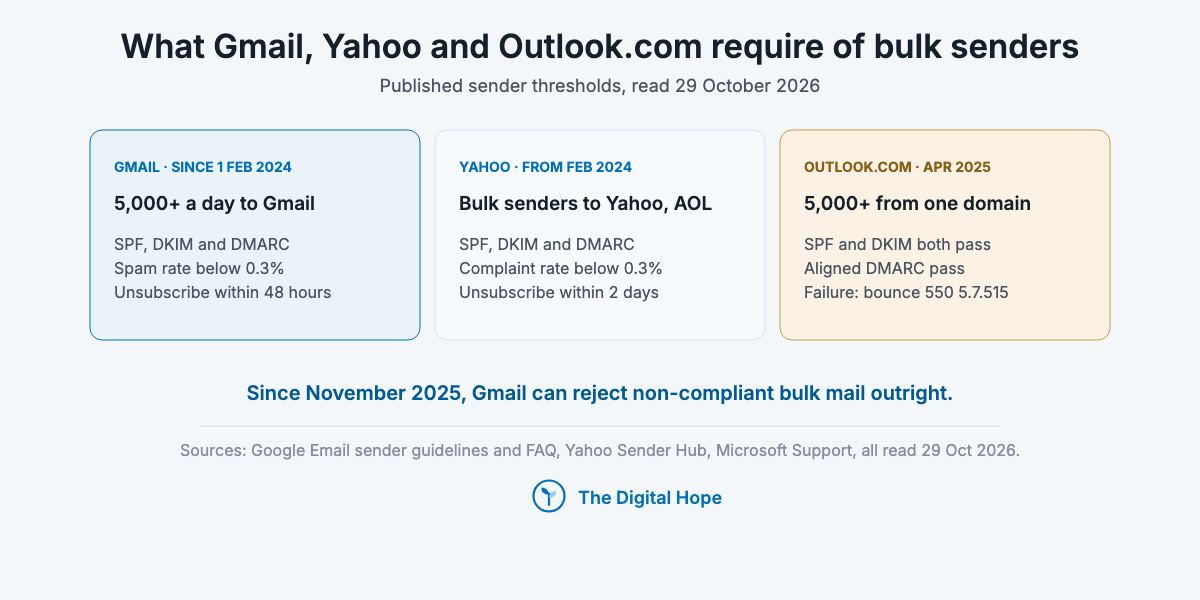
Deliverability is now an authentication and complaint-rate problem with published thresholds, and copy only matters once those are met. Three mailbox providers set the same baseline for high-volume senders, and an IETF standard defines the unsubscribe they require.
| Requirement | Gmail (since 1 Feb 2024) | Yahoo (from Feb 2024) | Outlook.com (announced Apr 2025) |
|---|---|---|---|
| Who it applies to | 5,000+ messages a day to Gmail accounts | Bulk senders to Yahoo and AOL | 5,000+ messages from one From domain |
| Authentication | SPF, DKIM and DMARC (p=none accepted), From domain aligned with SPF or DKIM | SPF, DKIM and DMARC (p=none or stronger) | SPF and DKIM both pass, DMARC p=none or stronger, aligned DMARC pass |
| Complaint ceiling | Spam rate in Postmaster Tools below 0.3%, target below 0.1% | Complaint rate below 0.3% | Not stated on the page read |
| Unsubscribe | One-click (RFC 8058) plus a visible link, honoured within 48 hours | One-click (RFC 8058 POST highly recommended), honoured within 2 days | Not stated on the page read |
| What failure looks like | Temporary and permanent rejections since November 2025 | Not stated on the page read | Bounce “550 5.7.515” |
Sources: Google sender guidelines and FAQ, Yahoo Sender Hub best practices, Microsoft Support on error 550 5.7.515, all read 29 October 2026.
Three details catch growing lists:
- Bulk status at Gmail is permanent. A domain that sends 5,000 messages to Gmail in one day, once, is treated as a bulk sender from then on, per Google’s FAQ. A single launch blast moves you into the rules for good.
- Losing the complaint line costs a week. Since June 2024, Google says senders above 0.3% are not eligible for mitigation until their rate stays below 0.3% for 7 consecutive days.
- One-click unsubscribe means two headers, not a footer link. RFC 8058 (January 2017) defines it as a List-Unsubscribe header with an HTTPS address plus List-Unsubscribe-Post: List-Unsubscribe=One-Click, both covered by a valid DKIM signature. Without that signature, receivers should not offer one-click at all.
Below 5,000 a day, the rules still point the same way. Gmail requires every sender, since 1 February 2024, to use SPF or DKIM, valid forward and reverse DNS, TLS, and a spam rate below 0.3%. A small list that sets up the full bulk baseline from day one never has to migrate under pressure. For a list that will stay small, the bulk rules are recommended practice, but the complaint ceiling already applies.
Meeting the requirements is necessary, not sufficient. They remove the most common reasons mail is rejected. Whether it lands in the inbox still depends on whether people wanted it, which is why the opt-in comes first.
Set it up before you grow.
Quick Summary
Q: What are the Gmail and Yahoo bulk sender requirements?
A: Since February 2024, senders of 5,000+ messages a day to Gmail must authenticate with SPF, DKIM and DMARC, support one-click unsubscribe (RFC 8058) and keep reported spam below 0.3%. Yahoo sets the same 0.3% ceiling and asks for unsubscribes within 2 days. Outlook.com applies the same authentication baseline to 5,000+ senders.
Insight “Keep spam rates reported in Postmaster Tools below 0.3%.” Google, “Email sender guidelines”, requirements for all senders (read 29 October 2026). The line sits in the section for every sender, not only bulk senders, so the complaint ceiling binds a list of 500 as much as a list of 500,000. The bulk section adds the 0.1% target to aim for.
So the list gets built backwards: inbox first, then the offer.
How to build an email list that reaches the inbox, in five steps
“Confirm each recipient’s email address before subscribing them.”
Google, “Email sender guidelines” (read 29 October 2026)
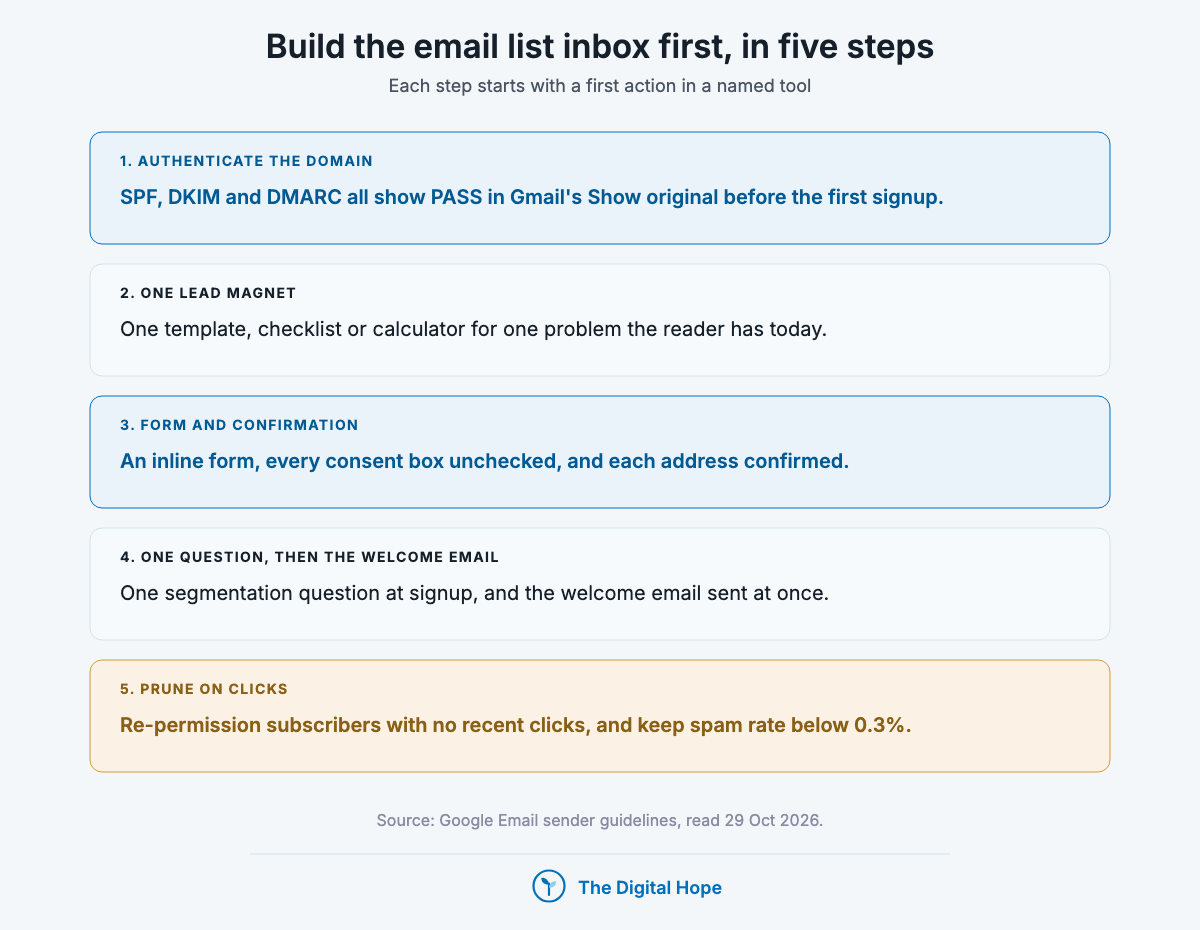
Authenticate the sending domain before the first signup, offer one lead magnet that solves one problem, place the opt-in form where it doesn’t block the page and confirm every address, ask one segmentation question and send the welcome email at once, then prune the list on a schedule. Each step starts with a first action in a named tool.
1. Authenticate the sending domain before the first signup
First action: send a test email from your email service provider (ESP) to a Gmail address, open it, and choose More, then Show original. Gmail lists the SPF, DKIM and DMARC results at the top. All three should read PASS, and the DKIM domain should match your From domain.
Then set up the reporting. Add your domain to Google Postmaster Tools, where Gmail reports the spam rate the 0.3% rule is measured on. Publish a DMARC record at p=none with a rua address so you receive aggregate reports. Yahoo strongly recommends that reporting, and it shows every service sending as your domain, including the ones nobody told you about. Move to a stricter DMARC policy only when the reports show every legitimate sender passing.
Check the unsubscribe headers in the same raw message. Look for List-Unsubscribe and List-Unsubscribe-Post. If they are missing, your ESP either does not add them or needs a setting switched on, and that is a support ticket to raise before growth, not after.
When to skip this step: never. If you are on a new domain or a shared ESP domain, send from your own authenticated domain, because the reputation you build should belong to you.
- Do SPF, DKIM and DMARC all show PASS in Show original?
- Does the DKIM signing domain match the From address your subscribers see?
- Is the domain verified in Postmaster Tools, and who reads it each week?
- Which services send as your domain that you didn’t know about until the DMARC report?
An afternoon now saves a migration later.
2. Build one lead magnet that solves one problem the reader has today
First action: pull ten recent questions from your sales calls, support tickets or Search Console queries, and pick the one that recurs and can be answered with something the reader can use the same day: a checklist, a template, a calculator, a short course by email. The question decides the format, not the other way round.
A lead magnet is an exchange. The reader gives an address and permission, and the offer has to be worth that on the page where they meet it. The magnets that hold up do one job for one reader: a template for the step they are stuck on, a calculator that uses their own numbers, a checklist they will print. Giving away a bundle of everything you have written makes the offer harder to judge, and it says nothing about what the subscriber wants next.
Match the magnet to the page it sits on. A lead magnet that extends the article it appears on (a content upgrade) is relevant by construction. Building those pages in the first place is the work of a content marketing system, and the magnet is where that system turns readers into subscribers.
Gated or ungated is a condition, not a rule. No published study with a stated method compares the two, so decide by buyer. For B2B teams that sell through sales, with a qualifying form and someone who follows up, gating a substantial asset can make sense. For B2C and creator lists, or buyers who research alone before talking to anyone, publish the substance openly and offer the email course or the template as the subscription reason.
- Which question did buyers ask most this month that a template or checklist could answer?
- Would the reader use the magnet this week, or file it?
- Does it extend the page it sits on, or would it fit any page on the site?
- What does the first email after the download offer that the magnet didn’t?
One problem, one magnet.
3. Place the opt-in form where it doesn’t block the page, and confirm every address
First action: open your highest-traffic page on a phone and note whether any sign-up dialog covers the content on load. If it does, replace it with an inline form below the first useful section and a small banner, and keep the dedicated landing page for paid and social traffic.
Google is specific about dialogs. Its Search Central page on intrusive interstitials and dialogs (updated 10 December 2025) says they “may lead to poor search performance”, tells site owners not to obscure the entire page, and recommends instead to “use banners that take up only a small fraction of the screen to grab your users’ attention.” If you depend on a page for search traffic, a full-screen pop-up trades rankings for signups. For a paid landing page whose only job is the signup, the form is the page.
The placements that respect that line:
- Inline, after the first section that delivered value, where the reader has seen what you know.
- At the end of the article, as the next step for someone who finished it.
- A small banner or a slide-in that leaves the content readable.
- A dedicated landing page for one magnet, used as the destination for social posts and ads.
Ask for the minimum. An email field, plus at most the one segmentation question in step 4. Leave every consent box unchecked: Google tells senders to avoid opt-in forms checked by default, and UK and EU consent requires an active choice.
Then confirm the address. Double opt-in sends a confirmation email and subscribes the address only after the click. Google’s guidelines ask senders to confirm each address before subscribing it, and the confirmation click keeps out typos, bots and addresses entered by someone else, each of which inflates bounces or complaints. It also leaves you a dated record of consent.
The trade-off is real: some genuine subscribers never click the confirmation, and no published dataset with a method measures how many. For B2C lists in the UK or EU, or any list fed by open web forms, confirm every address. For B2B lists fed only by demo requests your team follows up on, a single opt-in with an immediate welcome email is defensible, if you watch bounces closely.
- Does any dialog cover the content of a search landing page on mobile?
- How many fields does your form ask for, and which would you drop tomorrow?
- Is every consent box unchecked when the page loads?
- What share of new signups confirm within a day, and does your ESP show it?
Confirmed beats counted.
4. Ask one segmentation question, then send the welcome email at once
First action: in your ESP’s form builder, add one optional question with three or four answers that change what you would send: the reader’s role, the problem they came for, or the kind of business they run. Map each answer to a tag, and map each tag to a different second email.
Segment on what you will act on. A field you never use for a send is friction with no return. If you run a small list, one question is enough, because more groups than you can write for each week means some groups get nothing. For a larger list with several products, the same one question at signup, plus click behaviour later, usually beats a long profile form, because readers answer one question and skip five.
The welcome email goes out immediately. It is the email most likely to be expected, so it delivers the magnet, says how often you will write and about what, and asks for nothing yet. With double opt-in, the confirmation email comes first and the welcome follows the click.
The nurture sequence earns the next step. Plan the emails that follow by the segment’s question: what they need to know, in what order, before an offer makes sense to them. Writing each email, from subject line to call to action, is covered in email copywriting. The list-building rule is simpler: every email keeps the unsubscribe one click away, because an easy exit costs you a subscriber and a hidden one costs you a complaint.
- Which single question would change what you send next?
- Does every answer map to a tag, and every tag to a different email?
- Does the welcome email say how often you’ll write?
- Where does the nurture sequence end, and what happens to someone who never clicks it?
Fewer questions, better answers.
5. Prune the list on a schedule, using clicks, not opens
First action: in your ESP, build a segment of subscribers who have not clicked in your last several sends over a period that fits your frequency, and send them one plain email asking whether they want to stay. Remove everyone who doesn’t click it.
Google asks for exactly this. Its sender guidelines tell list owners to periodically confirm that recipients want to stay subscribed and to consider unsubscribing those who don’t open or read. Judge “inactive” on clicks, not opens, because Apple Mail Privacy Protection records an open for protected users whether or not they read anything (the next section explains). An inactive segment built on opens keeps exactly the readers you should be asking.
Remove the rest of the risk on every send: hard bounces at once, spam complaints at once, and unsubscribes within 48 hours for Gmail and 2 days for Yahoo, inside CAN-SPAM’s 10 business days. Never buy, rent or append addresses to “refill” a list. Google tells senders not to, and the complaints land on the domain you just authenticated.
The condition is list size and age. If you grew the list fast from a giveaway or a partnership, prune before the next big send, because that is where the people who never meant to subscribe sit. For a slow-grown list of people who confirmed, a quarterly pass is enough.
- When did each subscriber last click, and does your ESP let you segment on it?
- Who on the list has never clicked anything since they joined?
- Are complaints and hard bounces removed automatically?
- Which source added the most addresses last quarter, and how do those subscribers behave now?
A smaller list sends better.
Quick Summary
Q: How do you build an email list that reaches the inbox?
A: Authenticate the sending domain (SPF, DKIM, DMARC, one-click unsubscribe headers) before the first signup, offer one lead magnet for one problem, place an unchecked opt-in form inline rather than in a page-covering pop-up, confirm each address, ask one segmentation question, send the welcome email at once, and prune inactive subscribers on clicks, not opens.
Insight “Banners ensure that users and search engines can get to the content as soon as they land on the page.” Google Search Central, “Avoid intrusive interstitials and dialogs” (updated 10 December 2025). The signup form and the page’s search visibility share one screen, and Google’s guidance resolves the trade with a placement rule, not a ban on asking.
Measure the list on clicks and complaints, because opens stopped meaning reads
“In the Mail app, Mail Privacy Protection stops senders from using invisible pixels to collect information about the user.”
Apple Newsroom, iOS 15 announcement (7 June 2021)
An “open” is recorded when the tracking pixel loads, and for Apple Mail users with Mail Privacy Protection on, Apple loads it whether or not the person reads the email. Apple’s own documentation says remote content is downloaded in the background “regardless of whether you engage with the email”. So the open still fires for those users, it stops telling you anything.
The scale is not small. In Litmus’s September 2026 data, Apple Mail accounted for 76.56% of 1.5 billion+ tracked opens, Gmail for 16.10% and Outlook desktop for 3.48%. That share is inflated by the prefetching itself, and Litmus’s customers skew to larger consumer senders, so it does not tell you the share on your list. It does tell you why an open rate that jumped after 2021 never came back down. “Open rates would have naturally trended from 20% to 60% naturally when iOS added Mail Privacy Protection,” an email marketer replied on Hacker News in February 2023 to a post about boosting open rates.
What to measure instead, in the tool that reports it:
- Click rate per send, in your ESP. MailerLite’s 2025 data puts the typical click rate at 2.09% across 3.6 million campaigns from 181,000 accounts, and its own authors call clicks the more reliable indicator. Its customer base is small businesses and creators, so treat it as context, not a target.
- Spam rate, in Google Postmaster Tools. The number the 0.3% ceiling is measured on, and the earliest warning a list is going wrong.
- Unsubscribe rate per send, in your ESP. MailerLite’s 2025 figure is 0.22%. A jump after one send points at that send’s audience or offer.
- Bounces by provider. A sudden collapse of clicks at one mailbox provider only, or 4xx deferrals and 550 rejections in the bounce log, is a deliverability problem, not a copy problem.
- Conversions from email, in GA4. Tag every link with UTM parameters so signups, demos or purchases from email show up as their own source.
The condition that flips it is the audience’s mail client. For B2C lists, which tend to be Apple-heavy, treat opens as noise. For B2B lists of corporate addresses read mostly in Outlook or Gmail, opens from those clients still carry some signal, and a sudden open collapse at one provider is a fast deliverability alarm. Never pick a subject-line winner on opens in either case. Test on clicks.
Measure the list as a whole, not only each send. Net growth per month (new confirmed subscribers minus unsubscribes, bounces and pruned addresses), and the share of new subscribers who click within their first few emails, show whether lead generation is adding readers or only addresses.
Clicks tell you who read it.
Quick Summary
Q: Are email open rates still reliable?
A: Not for Apple Mail users with Mail Privacy Protection on, because Apple loads the tracking pixel whether or not the email is read, and Apple Mail was 76.56% of tracked opens in Litmus’s September 2026 data. Measure click rate, spam rate in Google Postmaster Tools, unsubscribes, bounces by provider and conversions in GA4 instead.
Insight “The new feature helps users prevent senders from knowing when they open an email, and masks their IP address” Apple Newsroom, announcing Mail Privacy Protection with iOS 15 (7 June 2021). The mechanism is prefetching, not blocking, which is why the open rate rose instead of falling, and why “inactive” segments built on opens stopped finding inactive readers.
What stopped being true
| What | When | Primary source |
|---|---|---|
| Deliverability as mostly copy and “spam words” | SPF, DKIM, DMARC, one-click unsubscribe and a 0.3% complaint ceiling required for bulk senders from 1 February 2024 | Google Email sender guidelines and Yahoo Sender Hub |
| Non-compliant bulk mail landing in spam at worst | Gmail began temporary and permanent rejections, November 2025 | Google Email sender guidelines FAQ |
| No published sender baseline at Outlook.com | 5,000+ senders need SPF and DKIM passing and aligned DMARC, or get 550 5.7.515 (announced April 2025) | Microsoft Support |
| A footer unsubscribe link being enough for marketing mail | One-click unsubscribe headers (RFC 8058) required for bulk senders, February 2024 | Google Email sender guidelines, Yahoo Sender Hub and IETF RFC 8058 |
| Sending fewer emails to drop out of Gmail’s bulk rules | Bulk status is permanent once a domain reaches 5,000 in a day | Google Email sender guidelines FAQ |
| Open rate as a measure of who read the email | Mail Privacy Protection announced with iOS 15, 7 June 2021 | Apple Newsroom and Apple’s Mail Privacy Protection page |
| Older per-email CAN-SPAM penalty figures | $53,088 per violating email, updated January 2024 | FTC CAN-SPAM compliance guide |
| Full-screen pop-ups over content on search landing pages | Google says intrusive dialogs may lead to poor search performance (page updated 10 December 2025) | Google Search Central |
| Pre-checked opt-in boxes and bought lists | Named as practices to avoid in Gmail’s sender guidelines (read 29 October 2026) | Google Email sender guidelines |
Pulling it all together
Authenticate first. Send a test to Gmail today, open Show original, and write down which of SPF, DKIM and DMARC fail.
One magnet, one problem. Pick the buyer question that recurs most this month and turn it into one template, checklist or calculator.
A form that doesn’t block the page. Replace any page-covering pop-up on a search landing page with an inline form, and switch on address confirmation.
One question at signup. Add the one segmentation question that changes the second email, and make the welcome email go out on confirmation.
Prune on clicks. Schedule a quarterly re-permission email to subscribers with no recent clicks, and remove those who don’t respond.
Measure what reaches people. Verify the domain in Postmaster Tools, and add UTM tags to every email link this week.
Frequently asked questions
What is email lead generation? It is earning opt-in subscribers through an offer, a sign-up form and a reason to stay, so you can reach them again without paying a platform each time. It is permission-based. Prospecting email to people who never signed up is a separate discipline under different rules.
Do the Gmail and Yahoo sender rules apply to small lists? Partly. The bulk requirements start at 5,000 messages a day to Gmail, but every sender to Gmail must use SPF or DKIM, valid DNS, TLS and keep reported spam below 0.3% (since February 2024). Once a domain reaches 5,000 to Gmail in one day, Google treats it as a bulk sender permanently.
Is B2B email exempt from email law? No, in the US. The FTC says CAN-SPAM makes no exception for business-to-business email. In the UK, PECR lets you email corporate addresses without prior consent, but sole traders and some partnerships count as individuals, and the ICO’s guidance is under review after the Data (Use and Access) Act 2025.
Should I use double opt-in? For open web forms, and for consumer lists in the UK or EU, yes. Google’s sender guidelines ask senders to confirm each address before subscribing it, and confirmation keeps out typos, bots and fake signups. Some genuine subscribers never confirm, and no published study with a method puts a number on that, so watch your own confirmation rate.
What is a good email open rate? There isn’t a usable one. Apple Mail Privacy Protection loads tracking pixels whether or not the email is read, and Apple Mail made up 76.56% of tracked opens in Litmus’s September 2026 data. Use click rate instead: MailerLite’s 2025 data across 3.6 million campaigns puts it at 2.09%, as context rather than a target.
Are pop-up sign-up forms bad for SEO? Full-screen dialogs that cover the content can be. Google’s guidance (updated 10 December 2025) says intrusive interstitials may lead to poor search performance and recommends banners that take up a small fraction of the screen. Inline forms and small banners avoid the problem.
In a nutshell
A list is worth what reaches the inbox, and that is decided by consent, authentication and complaints before copy. Set up SPF, DKIM, DMARC and one-click unsubscribe before the first signup, confirm every address, and judge the list on clicks and complaint rate, not opens.
Give it two quarters before you judge it. Authentication and a first lead magnet take a week or two. The first quarter builds the subscribers and the welcome sequence, and the second shows whether they click, convert and stay below the complaint line. This guide does not apply to cold outreach to people who never opted in, and what would change the call is a further tightening of the providers’ complaint thresholds, which none had announced as of October 2026.
About this article

Written by
Sai Subramaniam
SEO, GEO and Paid Ads Manager · 8+ years in growth marketing
I have run SEO, paid media and ABM for B2B AI companies, consumer apps and live-entertainment brands, from a solo operator at an AI infrastructure company to a team of 20 recovering a million-visitor site after a Google update. I write these guides from that work, and every number in them carries its source.
See my portfolioConnect on LinkedInHow this one was checked. Every number traces to a named source with its dataset and period, and every platform feature, policy or limit cites the platform’s own documentation with the date it was verified. Where the author’s own results appear, they are labelled as one account’s results, with the budget and context, not as a rule.
No affiliate links and no paid placements. Tools are named because they are what practitioners use, not because anyone paid to appear here.
Reviewed: October 2026. Ad platforms and search features change every few months; anything we could not verify at the time of writing is marked as unverified rather than turned into a number.
Corrections. If something here is wrong or has changed since, we would rather know. Corrections are made in place, with a note saying what changed.