
Last updated: October 2026.
On-page SEO decides two things: whether Google can read, index and show a page, and whether the page says something worth showing. Everything you change on the page itself serves one of those two jobs.
Google writes the title link itself, builds most snippets from the page content, and says there are no additional requirements to appear in AI Overviews or AI Mode beyond being indexed and snippet-eligible. So the levers on the page are eligibility and substance, and the tags are inputs Google reads rather than text it repeats.
The click payoff has also moved. Ahrefs’ analysis of 300,000 keywords (December 2025 data, published February 2026) associated an AI Overview with a roughly 58% lower click-through rate for the top-ranking page, compared with a forecast from keywords without one. It is desktop data and correlational, so it does not show cause. It does raise the bar for every element below: the page has to earn the ranking and then give a reason to click past the summary.
This guide covers the page itself, with the title tag in full depth. Writing for search lives in SEO content writing, and sitewide crawl and speed work in website optimization.
Quick Digest
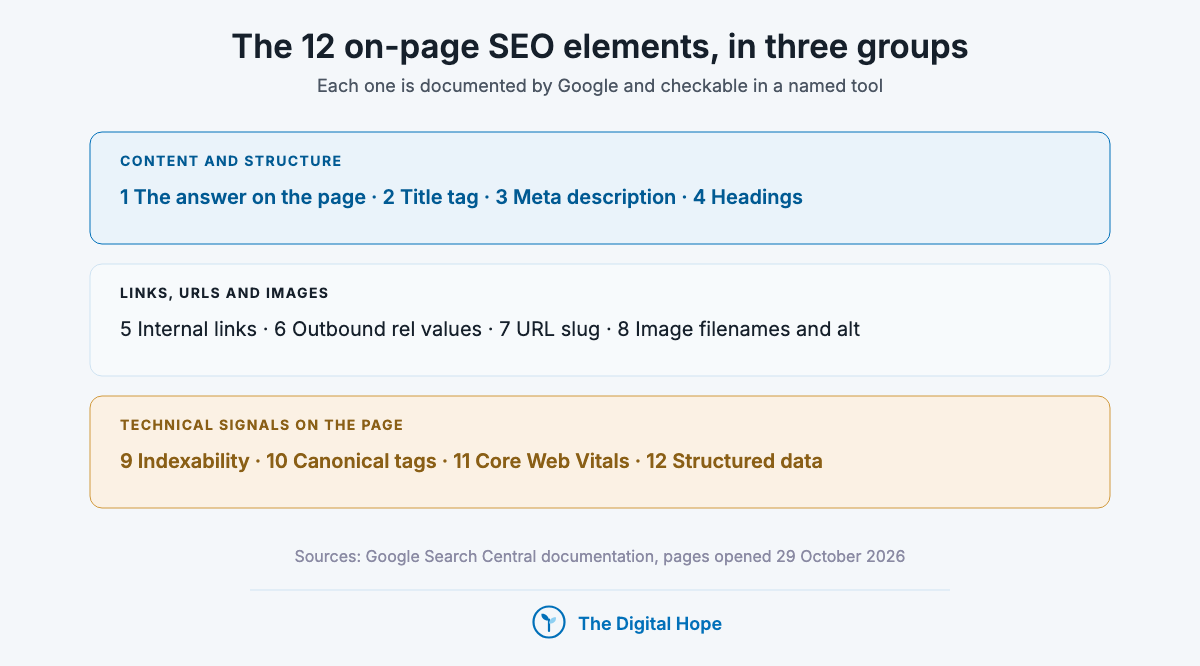
– Twelve elements do the work: the content, title, meta description, headings, internal links, outbound links, URL, images, indexability, canonicals, Core Web Vitals and structured data.
– Title tags are an input, not the headline: Google generates the title link and corrects half-empty, outdated, inaccurate or boilerplate titles.
– AI Overviews need nothing special: an indexed, snippet-eligible page, per Google’s documentation.
– What to fix first depends on site type: small sites start with content and links, large templated sites with indexing and templates.
– One table near the end lists the on-page tactics Google has retired, with dates.
How we judged each element
Every element on this list passed three tests. The order inside each group follows the first two.
- Google documents it: the element appears in current Search Central documentation, cited here with that page’s last-updated date.
- It changes eligibility or understanding: it affects whether a page is crawled, indexed, shown with a snippet, or understood.
- You can check it in a named tool: Search Console, Lighthouse, the Rich Results Test, or the page source.
How we know
Sources: Google Search Central documentation and its changelog, each page opened on 29 October 2026, with last-updated dates from December 2025 to October 2026.
Studies: Zyppy’s Q1 2022 title study (80,959 titles across 2,370 sites), Ahrefs’ 300,000-keyword AI Overview click study (February 2026), and one controlled crawler test on a single 2,400-page site reported by Search Engine Land (August 2026).
The limit: Google documents what it uses, not how much each element weighs. Nothing here shows that changing one element moves a ranking by a set amount.
The 12 elements at a glance
- 1. The answer on the page: the element every other one describes. Fix first on every page.
- 2. Title tag: the main input for the title link. Descriptive, unique, matched to the H1.
- 3. Meta description: optional copy Google sometimes uses. Unique per page, then leave it.
- 4. Headings: the outline of the argument, and the main visible title Google reads.
- 5. Internal links and anchor text: how crawlers, including AI crawlers, find pages. Keep them in the HTML.
- 6. Outbound links and rel values: cite freely, mark anything paid as sponsored.
- 7. URL slug: readable words and hyphens, then leave it alone.
- 8. Images: descriptive filenames and alt text written for people.
- 9. Indexability and snippet eligibility: the entry ticket for results and AI Overviews.
- 10. Canonical tags: optional on a small blog, required on a large catalogue.
- 11. Core Web Vitals: a confirmed ranking input, measured on real users.
- 12. Structured data: only types listed in Google’s search gallery.
Content and structure: four elements that decide what the page is about
1. The answer itself: content that matches the query and adds something
Search intent comes first because every other element on this list only describes the content. Google’s AI optimization guide (Search Central, updated 10 July 2026) says creating content people find “unique, compelling, and useful” will likely influence a site’s presence, and that there is no requirement to break content into tiny pieces for AI.
| What it is | The main content, judged on whether it answers the query type (learn, compare, buy, find) with something the other results lack |
| Why it matters now | AI Overviews reached all US users in May 2024 and answer many simple informational queries above the results, so the commodity answer is already on the page before yours |
| How to check | Search the query, note what the top results and any AI Overview already say, then write down in one line what your page adds that they don’t |
Who it’s for: Every page, and most of all informational pages on queries that show an AI Overview.
In practice: Sort the target query by intent first: navigational, transactional or learning. Then give the page something to be cited for: first-hand data, a worked example or a decision rule. A page that restates the top results has little left to offer once the summary has answered. If you can’t name what the page adds, fix that before touching any tag.
Verdict: Fix this before any tag.
2. Title tag: how Google builds the title link, and how to write one it keeps
The title tag is the strongest input for the clickable headline in Google, but it is an input. Google’s title link documentation (updated 10 December 2025) says its generation of title links “is completely automated”, drawing on the title element, the main visible title, headings, og:title, anchor text, links pointing to the page and WebSite structured data.
| What it is | The title element in the page head, also used as the browser tab label and the default headline when the page is shared |
| How Google uses it | As the first candidate for the title link. Google sets no length limit on the element and truncates the title link as needed, typically to fit the device width |
| How to check | Search your top pages and compare the title link with your title element. In Search Console, a page whose impressions hold while clicks fall is a candidate for a title review |
What makes Google replace a title. The same documentation names the issues it corrects, and each one is a fix you control:
- Half-empty titles: part of the title is missing, so Google pulls from headings or other prominent text.
- Obsolete titles: a recurring page still carries last year’s date while the visible heading shows the current one.
- Inaccurate titles: the title doesn’t describe what the page now contains.
- Micro-boilerplate: pages share near-identical titles, so Google adds the detail that tells them apart.
- No clear main title: several headings look equally prominent, so Google may use the first one.
- Language or script mismatch: the title is in a different language or writing system from the page.
- Duplicated site name: if the site name already shows in the result, Google may drop it from the title link.
How to write one. Google’s own best practices reduce to six habits. Give every page its own title. Describe the page in plain words, without vague labels like “Home” and without padding. Don’t repeat keywords. Brand it once, usually with the site name at the start or end after a delimiter. Make the main heading the most prominent text on the page and match it to the title. Keep the title in the page’s own language.
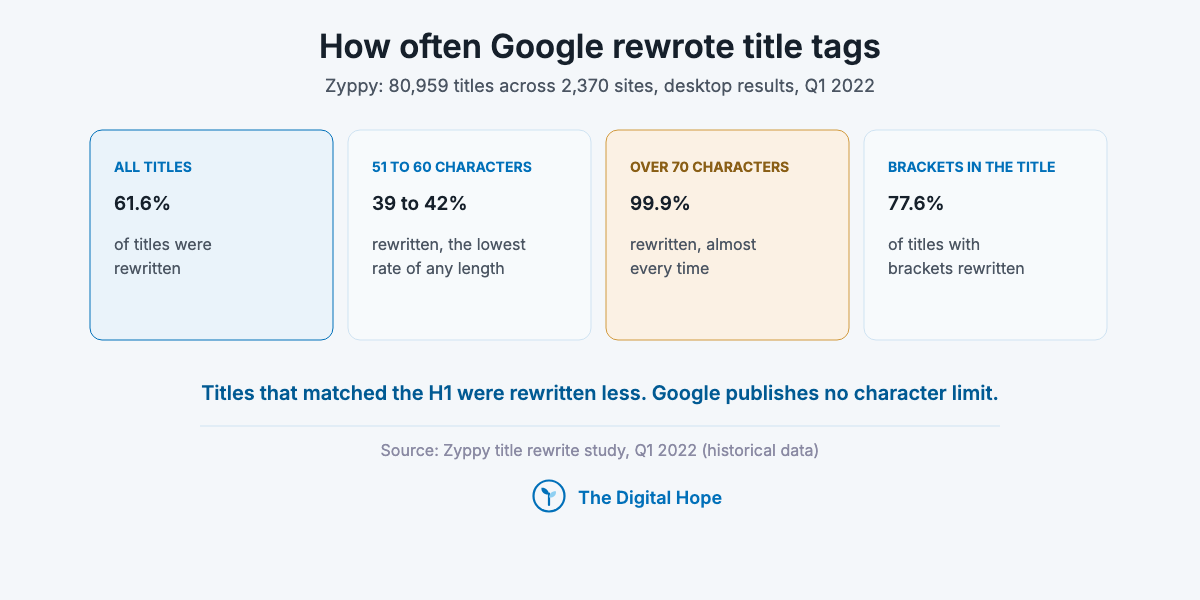
Length, with the year on the data. Google publishes no character limit. The only large measurement is Zyppy’s study of 80,959 titles across 2,370 sites, run on desktop results in Q1 2022: 61.6% of titles were rewritten, titles of 51 to 60 characters were rewritten least (39 to 42%), titles over 70 characters were rewritten 99.9% of the time, brackets were rewritten 77.6% of the time, and titles that matched the H1 were rewritten less. Treat it as a direction, not a rule: write the shortest title that fully describes the page, which usually lands near 60 characters.
Title patterns by page type.
| Page type | Pattern | Example |
|---|---|---|
| Home page | Brand, then what the site does | Acme Tools: Hand Tools for Furniture Makers |
| Category page | Category, qualifier, brand | Chisels for Woodworking, Bevel and Mortise, Acme Tools |
| Product page | Product name, model, key attribute | Acme 12 mm Bevel Edge Chisel, Japanese Steel |
| Article or guide | The question or task the page answers | How to Sharpen a Chisel With Water Stones |
| Landing page | The offer, then the brand | Free Joinery Course for Beginners, Acme Tools |
Templates at scale. On a catalogue with thousands of pages, titles come from a template, and the template is where boilerplate creeps in. Build the title from the fields that differ (product name, model, size, colour, location) and keep the fixed part short. If many pages still produce the same title, they may be near-duplicates, which is a canonical question (item 10), not a title one.
Testing a title change. Change titles on a group of similar pages, not one, and compare clicks and click-through rate in Search Console over the same weekdays before and after. Check the live title link first: if Google was already rewriting the old title, your change may not show at all.
Who it’s for: Every indexable page, and most of all sites with templated titles: the same long brand suffix, a date, or one pattern repeated across thousands of pages.
Verdict: Describe the page, match the H1, brand it once.
3. Meta description
Meta descriptions are optional copy that Google may or may not use. Its snippet documentation (updated 20 April 2026) says snippets are “primarily created from the page content itself”, and that Google sometimes uses the meta description when it gives a more accurate description of the page.
| What it is | The description meta tag: a short, page-specific summary |
| How Google uses it | As one possible snippet source. The same page says there’s no limit on its length, snippets are truncated to fit the device, and identical descriptions across pages are unhelpful |
| How to check | Crawl the site for missing or duplicated descriptions, then compare a sample of live snippets with your tags |
Who it’s for: Sites with many similar pages, such as products, locations or programmatic templates, where a unique description helps tell one page from the next.
In practice: Write one or two sentences that say what the page contains and who it’s for. When Google builds the snippet from the body, the tag changes nothing you can measure, so the work that pays is a clear first paragraph, because that is what the snippet is primarily built from. Writing descriptions by hand for every page is worth it only when you have many near-identical pages to tell apart.
Verdict: Unique and accurate, then leave it.
4. Headings
Headings help readers and parsers find the section that answers them. Google’s SEO starter guide (Search Central, updated 10 December 2025) says that from a Google Search perspective “it doesn’t matter if you’re using them out of order”, and that there is no ideal number of headings for a page.
| What it is | The H1 for the page topic, with H2 and H3 headings for its sections |
| How Google uses it | The H1 is one of the sources Google reads for the title link, and a page with several equally prominent headings gives it no clear main title |
| How to check | Read only the headings, top to bottom. If they don’t tell the argument, the page probably doesn’t either |
Who it’s for: Long pages: guides, comparisons and documentation, where a reader or a search feature lifts out one section.
In practice: Use one visible main heading that matches the title tag. Write section headings that state the answer, since they survive being lifted out of context better than headings that only name a topic. Keep the order logical for people using screen readers, even though Google doesn’t rank on it.
Verdict: Headings are the argument’s outline.
Quick Summary
Q: What on-page content elements matter most for SEO?
A: The content’s answer to the query comes first, then a descriptive title tag that matches the H1, a unique meta description and headings that state the argument. Google generates title links and builds most snippets from page content, so these are inputs, not guarantees.
Insight
Google’s guide puts it plainly: “optimizing for generative AI search is optimizing for the search experience, and thus still SEO.”
Google Search Central, AI optimization guide, last updated 10 July 2026.
Links, URLs and images: four elements crawlers follow
5. Internal links and anchor text
Internal links are how crawlers find pages and how readers find the next one. Google’s links documentation (updated 10 December 2025) says Google can generally only crawl a link if it’s an a element with an href, and that every page you care about should have a link from at least one other page on your site.
| What it is | Links between your own pages and their visible anchor text |
| Why it matters now | AI crawlers add a second reason to keep links in plain HTML. In one controlled test on a 2,400-page site (Search Engine Land, August 2026), GPTBot and ClaudeBot followed 0% of links injected by JavaScript, while HTML-linked pages were crawled within a day. One site, one period |
| How to check | View the page source, not the rendered page, and confirm important links are a href elements. Use Search Console’s Links report to find pages with few internal links |
Who it’s for: Sites built on JavaScript frameworks, and large sites where new pages sit several clicks deep.
In practice: Google sets no ideal number of links per page. If you run a JavaScript framework, check that navigation and in-content links are real a href elements in the HTML, because click handlers alone don’t get crawled. Link from pages that already get traffic to pages that need it, with anchors that say what the next page covers. Anchor text is also one of the sources Google reads for title links, so consistent, descriptive anchors help twice.
Verdict: Every link that matters goes in HTML.
6. Outbound links and their rel values
Outbound links tell readers where a claim came from, and the rel value is the part that carries risk. Google’s outbound links page (Search Central, updated 10 December 2025) asks for rel=”sponsored” on advertisements and paid placements, rel=”ugc” on user-generated content, and nofollow otherwise when you don’t want to be associated with the target.
| What it is | Links from your page to other sites, plus their rel attribute |
| Why it matters now | Since Google’s December 2022 link spam update, SpamBrain detects sites buying links and sites passing them, and neutralises the credit those links pass |
| How to check | Crawl outbound links, filter for affiliate, sponsored and partner domains, and confirm each carries rel=”sponsored” |
Who it’s for: Publishers with affiliate, sponsored or partner content, and any site that accepts guest posts.
In practice: Link wherever a reader needs the source to act. An unqualified paid link is a risk to the page that hosts it, not only to the buyer. Earning links instead of buying them is covered in our guide to backlink strategies.
Verdict: Cite where it helps, qualify anything paid.
7. URL slug
URLs are a small signal and a large risk when changed. Google’s URL structure page (Search Central, updated 21 October 2026) recommends readable words over long ID numbers and hyphens instead of underscores between words.
| What it is | The path after the domain, such as /seo/on-site-seo/ |
| Where the risk sits | Changing slugs. A moved page needs a redirect, which Google’s canonicalization page (updated 10 July 2026) treats as a strong signal for the new URL |
| How to check | List URLs carrying IDs, underscores, years or tracking parameters. Fix new pages at creation and leave working URLs alone |
Who it’s for: New sites and new sections. For established pages, only when the URL carries a year or a parameter that misleads readers.
In practice: This page’s own URL says on-site, not on-page, and it stays that way: renaming it for style would cost a redirect for no measurable gain. A year in a slug is the exception, because it dates the page the day the year ends. If you do change a slug, 301 the old URL to the new one and update the internal links in the same release.
Verdict: Get it right once, then leave it.
8. Images: filenames and alt text
Alt text and filenames are how Google understands an image. Google’s image SEO documentation (Search Central, updated 2 March 2026) asks for filenames that are “short, but descriptive”, warns against generic names like image1.jpg, and says to avoid filling alt attributes with keywords.
| What it is | The alt attribute, the filename, the text around the image and, optionally, an image sitemap |
| How Google uses it | To understand what the image shows. Image sitemaps can list image URLs on other domains, such as a CDN. Keyword-stuffed alt text is treated as keyword stuffing |
| How to check | Crawl for images missing alt text, then read a sample aloud: if the alt text sounds like a keyword list, rewrite it |
Who it’s for: Ecommerce, recipe and visual sites where image search sends traffic, and any site serving images from a CDN.
In practice: Alt text exists first for people using screen readers. Describe what the image shows in the context of the page, in a sentence a person would say. For B2C ecommerce, where image search can send product traffic, write both for every product image. For B2B pages, diagrams and screenshots still need alt text for screen-reader users, even when image search sends little.
Verdict: Describe the image, not the keyword.
Quick Summary
Q: How should internal links, URLs and images be set up for SEO?
A: Keep important internal links as plain HTML a href links with descriptive anchors, mark paid outbound links as sponsored, use readable hyphenated URLs you don’t change for style, and give images descriptive filenames and alt text without keyword lists.
Insight
“Good anchor text is descriptive, reasonably concise, and relevant to the page that it’s on and to the page it links to.”
Google Search Central, link best practices, last updated 10 December 2025.
Technical signals on the page: four elements that decide eligibility
9. Indexability and snippet eligibility
Indexability is the element every other one depends on. Google’s AI features page (updated 10 December 2025) says a page must be indexed and eligible to be shown with a snippet to appear as a supporting link in AI Overviews or AI Mode, and that there are no additional requirements beyond that.
| What it is | Whether the page can be crawled, carries no noindex, is the canonical version and is allowed a snippet |
| How Google uses it | The snippet controls (nosnippet, data-nosnippet, max-snippet) also limit what AI features show from a page. Google doesn’t guarantee every page gets indexed, and “Crawled, currently not indexed” is a decision, not an error |
| How to check | Run URL Inspection in Search Console on the page, then read the Page indexing report for the template it belongs to |
Who it’s for: Large and templated sites, where whole page types can sit in “Crawled, currently not indexed”.
In practice: A nosnippet tag added to keep text out of AI answers also removes the snippet from the regular listing, so decide it per page, not sitewide. Unless you have a licensing or legal reason to restrict snippets, leave them on. Blocking a URL in robots.txt doesn’t reliably keep it out of the index either. Use noindex for that. Ranking and citation don’t move together: in Ahrefs’ March 2026 data, only 37.9% of URLs cited in AI Overviews also ranked in the top 10 for the same query. Being indexed and snippet-eligible is the entry ticket to both.
Verdict: Check eligibility before polish.
10. Canonical tags
Canonical tags tell Google which of several near-identical URLs to show. Google’s canonicalization page (updated 10 July 2026) calls a rel=”canonical” annotation “a strong signal”, the same strength it gives a redirect, and a sitemap entry a weak one.
| What it is | A link rel=”canonical” in the page head pointing to the preferred URL |
| What it isn’t | A penalty fix. Google’s starter guide says content under multiple URLs is “inefficient, but it’s not something that will cause a manual action” |
| How to check | URL Inspection shows the user-declared and the Google-selected canonical. When they differ, Google overruled your hint, so check which of your own signals (redirects, internal links, sitemaps) point at the URL it chose |
Who it’s for: Ecommerce sites with filters and variants, sites with tracking parameters, and anyone syndicating content to other sites.
In practice: The same Google page says a site “will likely do just fine without specifying a canonical preference”, so a small blog can skip explicit canonicals. A catalogue with thousands of filter URLs can’t, because duplicates waste crawling on URLs nobody meant to rank.
Verdict: Small blog, optional. Large catalogue, required.
11. Core Web Vitals
Core Web Vitals are the speed element Google confirms its ranking systems use. Its page experience page (Search Central, updated 22 September 2026) says Core Web Vitals “are used by our ranking systems”, and in the same FAQ that Google “always seeks to show the most relevant content, even if the page experience is sub-par.”
| What it is | Three field metrics from real Chrome users: loading (LCP), responsiveness (INP) and visual stability (CLS) |
| The thresholds | INP has been the responsiveness metric since 12 March 2024. A good INP means at least 75% of interactions respond in under 200 milliseconds |
| How to check | Search Console’s Core Web Vitals report for field data grouped by template, then Lighthouse or PageSpeed Insights to diagnose one URL, including mobile usability |
Who it’s for: Sites on heavy themes, page builders or ad stacks, and any template where INP sits in the poor band.
In practice: Passing Core Web Vitals doesn’t lift a page that doesn’t answer the query. The same Google page says other page experience aspects beyond Core Web Vitals don’t directly help a site rank. Fixing a failing template is worth it when that template carries pages that already rank. If you have a small development budget, spend it on the failing template with the most ranking pages first.
Verdict: Fix failing templates, then stop.
12. Structured data that earns a result
Structured data earns rich results for the page types Google still supports. Google’s search gallery (updated 16 October 2026) lists 25 features, including Article, Breadcrumb, Product, Review snippet, Video, Event, Recipe and Organization.
| What it is | Schema.org markup, usually JSON-LD, describing what the page is: a product, an article, an event |
| Where it stops | Google’s July 2026 AI guide says structured data “isn’t required for generative AI search” and there’s no special schema for it |
| How to check | The Rich Results Test on one URL per template, then the enhancement reports in Search Console |
Who it’s for: Ecommerce, recipes, events, jobs, video and local businesses, where a rich result changes how the listing looks.
In practice: Mark up what the page is, using a type listed in the gallery, and keep it matching the visible content. Check the gallery before adding any type, because a feature Google no longer shows earns nothing and still has to be maintained.
Verdict: Gallery types only, kept accurate.
Quick Summary
Q: Which technical on-page elements affect whether a page can rank or appear in AI Overviews?
A: The page must be indexed and snippet-eligible, the canonical must point where you intend, failing Core Web Vitals templates should be fixed, and structured data helps only for feature types in Google’s gallery. Google lists no extra requirement for AI Overviews or AI Mode.
Insight
“Google Search always seeks to show the most relevant content, even if the page experience is sub-par.”
Google Search Central, Understanding page experience, last updated 22 September 2026.
All 12 elements side by side
| Element | What it decides | Check in | Act when |
|---|---|---|---|
| 1. The answer on the page | Whether the page deserves to rank or be cited | The live results page | Always, first |
| 2. Title tag | The main input for the title link | Results page vs your title | Clicks fall while impressions hold, or titles are templated |
| 3. Meta description | A possible snippet source | A site crawl | Many similar pages |
| 4. Headings | The main visible title and section lifting | The page outline | Long pages |
| 5. Internal links | Discovery by Google and AI crawlers | Page source, Links report | JS frameworks, deep pages |
| 6. Outbound rel values | Link spam exposure | A crawl of outbound links | Any paid or partner link |
| 7. URL slug | Readability, redirect risk | A URL list | New pages only |
| 8. Images | Image understanding | A crawl for alt text | Image-led sites |
| 9. Indexability | Eligibility for results and AI Overviews | URL Inspection | Templated sites |
| 10. Canonicals | Which duplicate is shown | URL Inspection | Filters, parameters |
| 11. Core Web Vitals | A confirmed ranking input, not a trump card | Core Web Vitals report | Template in the poor band |
| 12. Structured data | Rich results for gallery types | Rich Results Test | Products, events, recipes, video |
What to fix first, by site type
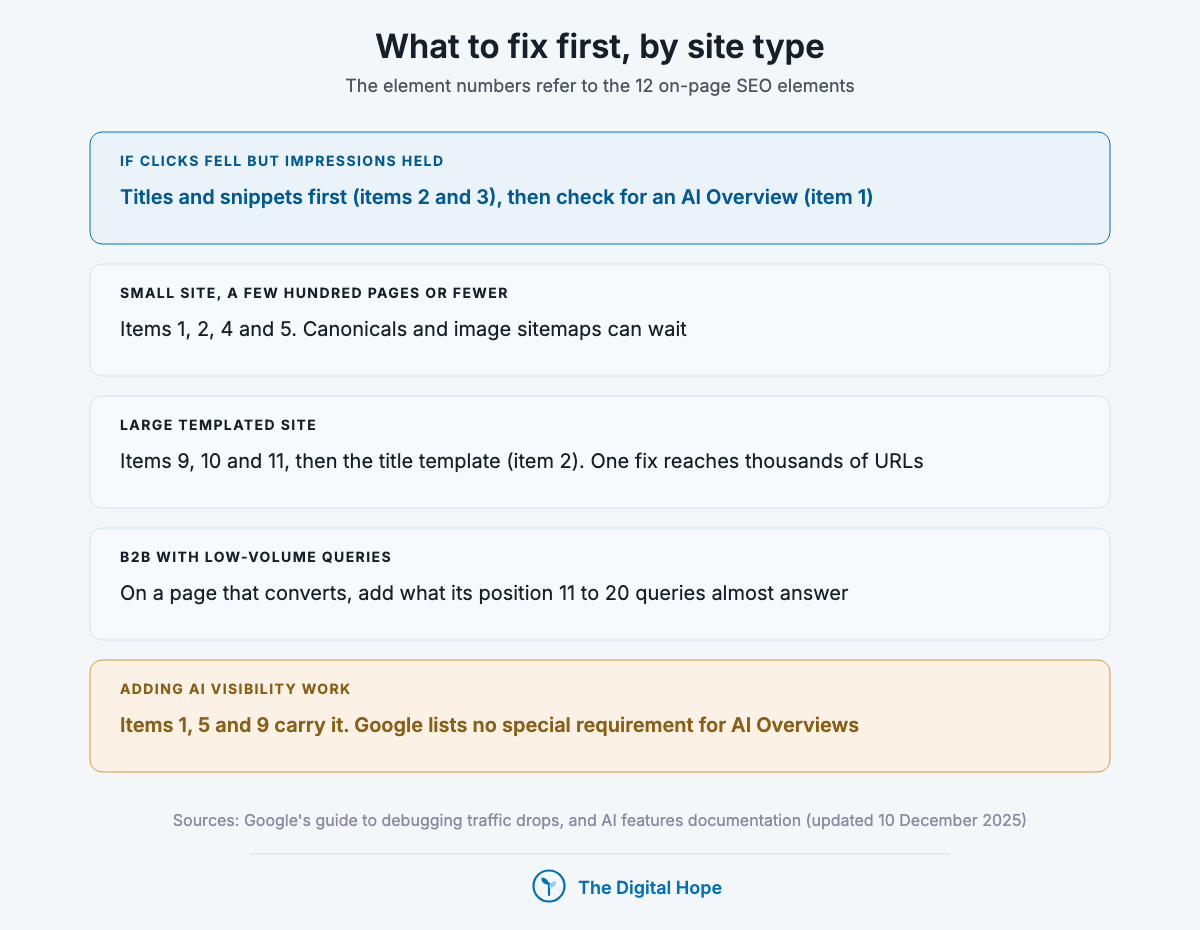
The order depends on what kind of site you run and what the data says. Five common conditions, each with its own starting point:
- If clicks fell but impressions held: Google’s guide to debugging traffic drops says that when only clicks fell, review your titles and snippets (items 2 and 3). Then check whether an AI Overview now appears on those queries, because a summary can take the click from an unchanged listing (item 1).
- If you run a small site of a few hundred pages or fewer: start with items 1, 2, 4 and 5. Canonicals and image sitemaps can wait until duplicates or image traffic give you a reason.
- If you run a large templated site: start with items 9, 10 and 11, then the title template (item 2), because one template fix moves thousands of URLs. Scaled pages with no added value carry spam-policy risk however they were produced.
- If you’re B2B with low-volume queries: in Search Console, filter a page that already converts for queries at positions 11 to 20. Those queries show what the page almost answers. Add the missing section, reflect it in the title if it changes what the page is about, and add an internal link from a related page.
- If you’re adding AI visibility work: Google lists no special requirement for AI Overviews, so items 1, 5 and 9 carry the work. The wider shift is covered in how AI is changing SEO.
For a full site audit rather than a page-by-page pass, use our SEO audit checklist.
Quick Summary
Q: What should I fix first in on-page SEO?
A: It depends on the site. If only clicks fell, start with titles and snippets. Small sites start with content, titles, headings and internal links. Large templated sites start with indexing, canonicals, Core Web Vitals and the title template, because one template fix reaches thousands of pages.
Insight
“There’s no guarantee that changes you make to your website will result in noticeable impact.”
Google Search Central, Google Search’s core updates, last updated 10 December 2025.
What stopped being true
Google has retired several on-page tactics outright. None of them belongs in a current checklist, and each has a primary source you can check.
| What | When | Primary source |
|---|---|---|
| FAQ rich results in Google Search | Removed 7 May 2026 (limited to government and health sites from August 2023) | Google Search Central documentation changelog |
| HowTo rich results | Stopped showing on all devices from 13 September 2023 | Google Search Central documentation changelog |
| Several other rich result types | Phased out in Google’s June 2025 search results simplification | Google Search Central blog, June 2025 |
| The Mobile-Friendly Test, its API and the Mobile Usability report | Retired from 1 December 2023 (mobile usability itself still counts, so check it in Lighthouse) | Google Search Central blog, 19 April 2023 |
| First Input Delay as a Core Web Vital | Replaced by INP on 12 March 2024 | Google Search Central documentation |
| The keywords meta tag, density targets and word-count minimums | Not used: Google says length alone “doesn’t matter for ranking purposes” | Google SEO starter guide, updated 10 December 2025 |
| A fixed character limit for titles or meta descriptions | Never a Google rule: no limit, truncated to fit the device | Google title link and snippet documentation |
| llms.txt as a route into AI answers | Not needed to appear in Google Search. Ahrefs found 97% of llms.txt files in a 137,210-domain sample got no requests (May 2026) | Google AI optimization guide, updated 10 July 2026 |
Frequently asked questions
What is on-page SEO? On-page SEO is the work done on a page itself so search engines can understand, index and show it, and so readers find what they searched for. It covers the content, title tag, meta description, headings, links, URL, images, indexing signals, page speed and structured data.
What’s the difference between on-page, off-page and technical SEO? On-page SEO is what you change on one page. Off-page SEO is what happens elsewhere, mostly links and mentions from other sites. Technical SEO is sitewide crawling, rendering and speed. Items 9 to 11 sit where on-page and technical overlap, because they’re set per page but usually fixed per template.
Does on-page SEO matter with AI Overviews? Yes. Google’s AI features page says a page must be indexed and snippet-eligible to appear as a supporting link, and it names no other requirement. What changed is the payoff: one 300,000-keyword study associated an AI Overview with a roughly 58% lower click-through rate for the top result, so the page has to give a reason to click.
Do I need special schema or chunked content for AI search? No. Google’s AI optimization guide (updated 10 July 2026) says structured data isn’t required for generative AI search, there’s no need to break content into tiny pieces, and no new AI text files are needed to appear in Google Search.
How long should a title tag be? Google sets no limit on the title element and truncates the title link to fit the device. In Zyppy’s Q1 2022 data, titles of 51 to 60 characters were rewritten least and titles over 70 characters almost always. Write the shortest title that fully describes the page.
Why does Google show a different title from my title tag? Google generates title links automatically and replaces titles that are half-empty, outdated, inaccurate, boilerplate, in a different language from the page, or unclear about the main heading. Fix those and match the title to the H1. Google doesn’t change title links manually for individual sites.
Should the keyword go at the start of the title? Put the words searchers use where they read naturally, usually early because long titles get truncated. Google’s guidance is about describing the page accurately and avoiding repeated keywords, not about position.
Is duplicate content a penalty? No. Google’s starter guide says content under multiple URLs is inefficient but won’t cause a manual action. On a large site the waste adds up, which is what canonical tags are for.
The verdict
On-page SEO comes down to two jobs: make the page eligible, and make it worth showing. Twelve elements serve those jobs, and the title tag is the one most worth getting right on every page, because it is the clickable headline Google starts from.
For a small site, the content, titles and links carry most of the weight. For a large templated site, indexing, canonicals and templates do. Revisit the list each time Google’s documentation changelog retires a feature. A Search Console report of AI clicks, or any Google requirement specific to AI Overviews, would move items 9 and 12 up the order.
If you’d rather have someone go through your templates and Search Console data with you, that’s what I do in a consultation.
About this article

Written by
Sai Subramaniam
SEO, GEO and Paid Ads Manager · 8+ years in growth marketing
I have run SEO, paid media and ABM for B2B AI companies, consumer apps and live-entertainment brands, from a solo operator at an AI infrastructure company to a team of 20 recovering a million-visitor site after a Google update. I write these guides from that work, and every number in them carries its source.
See my portfolioConnect on LinkedInHow this one was checked. Every number traces to a named source with its dataset and period, and every platform feature, policy or limit cites the platform’s own documentation with the date it was verified. Where the author’s own results appear, they are labelled as one account’s results, with the budget and context, not as a rule.
No affiliate links and no paid placements. Tools are named because they are what practitioners use, not because anyone paid to appear here.
Reviewed: October 2026. Ad platforms and search features change every few months; anything we could not verify at the time of writing is marked as unverified rather than turned into a number.
Corrections. If something here is wrong or has changed since, we would rather know. Corrections are made in place, with a note saying what changed.