
Last updated: October 2026.
Since 31 August 2026, every Search Console property can see how often its pages appeared in Google’s AI features, and still not how many clicks those appearances sent. Two months later, Search Console and your rank tracker stopped describing the same results: since October 2026, several rank-tracking vendors have said some of the Google results they collect are inaccurate, with Ahrefs putting the share at 5% to 20% depending on the data provider (reported by Search Engine Land, 27 October 2026).
An audit has to check the measurement before the site, and the site before the content. Here’s the reason. The expensive mistake is rarely a missing tag. It’s rewriting two hundred pages because of a drop that was a reporting change, a blocked crawler or a template that stopped rendering its links.
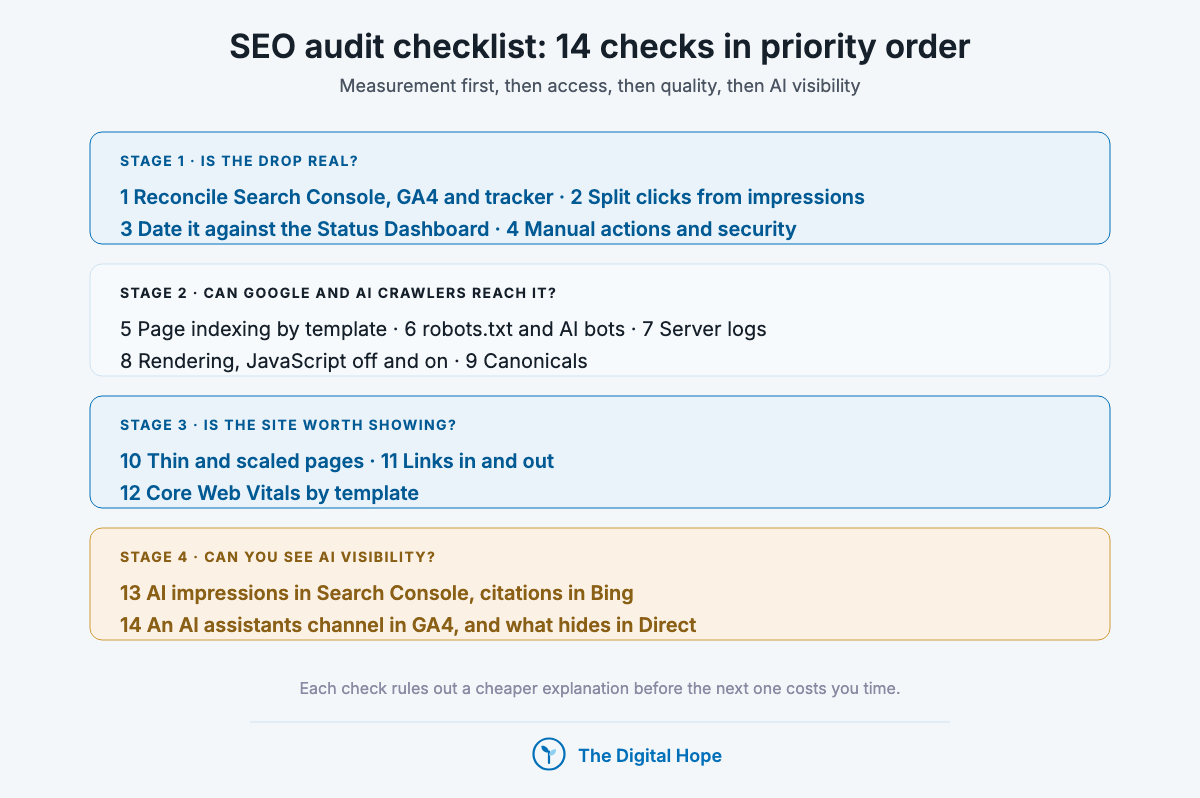
So this checklist runs in priority order: each check rules out a cheaper explanation before the next one costs you time. Every item names the tool you check it in: Search Console, GA4, a crawler or your server logs. Page-level fixes live in on-page SEO, and the sitewide technical work behind several checks in website optimization.
Quick Digest
– Check the numbers first: four checks confirm the drop is real, find its shape and date it against Google’s own record.
– Then check access: five checks confirm Google and AI crawlers can reach, render and index the pages that matter.
– Then check worth: three checks look for spam-policy exposure, risky links and failing templates.
– Then check AI visibility: two checks measure what Search Console, Bing and GA4 can and cannot see.
– One table near the end lists what stopped being true, with dates.
How we ordered the checks
Every check passed three tests, and the order follows the first one.
- It rules out an expensive wrong diagnosis: a check that stops you rewriting content for a reporting artefact goes before a check that tunes a template.
- It’s cheap to run: the first six run mostly in free Google tools.
- It has a named tool and a primary source: each one cites Google’s documentation, or OpenAI’s, Perplexity’s or Microsoft’s for their own crawlers and reports, with the date the page was last updated.
How we know
Sources: Google Search Central and Search Console Help pages, Google Analytics Help, OpenAI and Perplexity crawler documentation and Bing’s AI Performance announcement, each opened on 29 October 2026, last updated between December 2025 and October 2026.
Studies: SE Ranking’s 100,000-keyword spam update dataset (August 2026), one controlled crawler test on a single 2,400-page site (August 2026), one single-brand GA4 tracking study (September 2025 to June 2026), and Ahrefs’ AI Overview studies (February and March 2026).
The limit: Google documents what it checks for, not how much each factor weighs. Nothing here shows that fixing one item restores traffic by a set amount, and the first-party example is one site.
The 14 checks at a glance
- 1. Confirm the drop is real: Search Console against GA4 against your tracker, with every measurement break annotated.
- 2. Split clicks from impressions: Google’s own first fork in the diagnosis.
- 3. Date it against the Search Status Dashboard: an announced update, or something on your side.
- 4. Manual actions and security issues: the two reports that name a cause outright.
- 5. Page indexing by template: which page types Google chose not to index.
- 6. robots.txt and AI crawler controls: that the right bots are allowed, and the wrong one isn’t blocked.
- 7. Server logs: what Googlebot and AI crawlers fetch, verified.
- 8. Rendering: content and internal links in the initial HTML.
- 9. Canonicals and duplicates: Google’s chosen URL against yours.
- 10. Thin and scaled pages: exposure to the spam policies, page type by page type.
- 11. Links in and out: paid placements qualified, no links bought by a vendor score.
- 12. Core Web Vitals by template: INP, LCP and CLS on real users, mobile in Lighthouse.
- 13. AI impressions and citations: Search Console’s AI report and Bing’s AI Performance.
- 14. AI referrals in GA4: a channel for assistants, and the share that hides in Direct.
Is the drop real? Four checks before you touch the site
1. Confirm the drop is real: reconcile Search Console, GA4 and your tracker
Three tools, three different numbers, and only one of them measures Google clicks. Search Console reports clicks and impressions from Google itself. GA4 reports sessions it was allowed to record. A rank tracker reports what its scraper saw. When they disagree, the disagreement is the first finding.
| What it rules out | A drop that exists in one tool only: a reporting change, a consent banner change, or a tracker error |
| How to check | Put Search Console clicks, GA4 organic sessions and tracked positions for the same weeks side by side, then mark every known measurement break on the timeline |
| Tools | Search Console Performance report, GA4 Traffic acquisition, your rank tracker |
| Act when | Search Console holds while GA4 or the tracker falls: fix the measurement, not the site |
The breaks to annotate. From mid-September 2025, many sites saw desktop impressions fall and average position improve in Search Console after Google stopped supporting the 100-results parameter (Search Engine Roundtable, September 2025), so year-on-year impressions now compare across a reporting change. Since October 2026, trackers have their own known error. And GA4 counts only what consent allows: with basic consent mode, a visitor who declines sends Google no data at all (Google tag platform documentation, updated 30 July 2026), and GA4 only models those visitors above 1,000 consent-denied events a day for 7 days and 1,000 consenting daily users on 7 of 28 days (Google Analytics Help). If you change the consent banner, the change can look like an organic decline.
One more GA4 setting: explorations reach back only 2 or 14 months on a standard property, depending on the retention setting (Google Analytics Help). Set it to 14 months before you need it.
Who it’s for: Everyone, every time. It goes first because it’s the cheapest, and it matters most when you changed a consent banner, a tag or a tracker in the same quarter.
In practice: Keep a dated annotation log for the property: consent changes, site releases, migrations, tracker incidents and Google updates. An audit without one compares numbers that were never measured the same way.
Verdict: Prove the drop before you explain it.
2. Split clicks from impressions
Google’s own diagnostic starts with one fork. Its guide to debugging traffic drops (Search Central, updated 10 December 2025) separates drops where impressions and clicks both fell from drops where only clicks fell, and says that if only clicks fell, review your page titles and snippets.
| What it rules out | Looking for a site problem when the listing still shows and the click went elsewhere |
| How to check | In the Performance report, compare clicks, impressions and CTR for the affected pages and queries, before and after the drop |
| Tools | Search Console Performance report, filtered by page and by query |
| Act when | Impressions held while clicks fell: titles, snippets and the results page itself. Both fell: carry on to check 3 |
The part Google’s page doesn’t list. It names six causes of a drop: algorithmic updates, technical issues, security issues, spam issues, seasonality and site moves. It doesn’t name AI Overviews.
My read: when impressions hold and clicks fall on informational queries, search them and look at the page. Ahrefs’ analysis of 300,000 keywords (December 2025 data, published February 2026) associated an AI Overview with a roughly 58% lower click-through rate for the top-ranking page. It is desktop data and correlational, so it does not show cause, but it does mean a clicks-only drop can be a results-page change, not a defect you can fix on the page.
Who it’s for: Publishers, SaaS blogs and information sites whose traffic comes from informational queries. For B2B sites, separate the guides from the product and comparison pages before you read the drop.
In practice: Group the affected queries by intent. If the losses sit on “what is” and “how to” queries while commercial queries hold, rewrite titles last, and move the report toward the pages and queries that convert. Title and snippet craft is covered in on-page SEO.
Verdict: The shape of the drop picks the next check.
3. Date the drop against the Search Status Dashboard
A drop that lines up with an announced update is a different problem from one that lines up with a release. Google’s Search Status Dashboard is its own log of announced ranking updates. From February 2022 to 24 September 2026 it lists 39 entries, 15 of them core updates and 11 spam updates, with rollouts lasting from 19 hours 30 minutes to 45 days.
| What it rules out | Blaming an update for a drop that started on the day you shipped a release, or the reverse |
| How to check | Find the first day of the decline in Search Console’s daily view, then compare it with update start and end dates on the dashboard and with your own release log |
| Tools | Search Console (daily), Google Search Status Dashboard, your deploy history |
| Act when | The drop starts inside an update’s rollout window: wait for it to finish before judging. It starts on a release date: roll back or fix the release first |
Wait before you read it. Google’s core updates page (updated 10 December 2025) says to wait at least a full week after a core update completes before analysing, that some changes take effect in days but “it could take several months”, and that Google also runs smaller core updates it doesn’t announce. A step on a quiet date is not proof that nothing changed at Google, only that nothing was announced.
Who it’s for: Sitewide drops that land on one day across many page types. Only when the step is sitewide does the date carry this much weight.
In practice: Recent entries make the point. 2026 alone brought a May core update (from 21 May, 11 days 21 hours) and spam updates in August and September (from 24 September, 13 days 16 hours). The full timeline lives on our Google updates page.
Verdict: Match the date before the theory.
4. Check manual actions and security issues
These are the only two Search Console reports that name a cause outright. A manual action means a reviewer at Google applied it. A security issue means Google detected hacked content, malware or deceptive pages. Both sit in Search Console under Security and manual actions, and both appear in Google’s list of drop causes as spam and security issues.
| What it rules out | A penalty, in the strict sense, and an injected-spam or hacked-site problem |
| How to check | Open Manual actions and Security issues in Search Console. “No issues detected” closes this check |
| Tools | Search Console, Security and manual actions |
| Act when | Either report shows an issue: fix what it names and request a review before any other work |
Not every drop is a penalty. The word gets used for every decline, but a demotion by a ranking system after an update carries no manual action and no review process. Calling it a penalty sends teams looking for a single offending tactic that may not exist. Recovery after injected spam is a ranking question. Preventing the hack is a platform security question, covered in our guide to WordPress security.
Who it’s for: Every site, and first of all sites that host user content, guest posts or sponsored sections.
In practice: If both reports are clean and the drop matches an update window, you are looking at a ranking reassessment, and the remaining checks are about what the site gives Google to reassess.
Verdict: No manual action means no penalty.
Quick Summary
Q: What should I check first when organic traffic drops?
A: Confirm the drop exists in Search Console and not only in GA4 or a rank tracker, annotate measurement breaks such as the September 2025 impressions change and consent banner changes, split clicks from impressions, match the start date against Google’s Search Status Dashboard, and check the Manual actions and Security issues reports.
Insight
“There’s no guarantee that changes you make to your website will result in noticeable impact.”
Google Search Central, Google Search’s core updates, last updated 10 December 2025.
Can Google and AI crawlers reach it? Five checks on access and indexing
5. Read the Page indexing report by template
Google doesn’t index every page it can crawl, and says so. The Page indexing report documentation (Search Console Help, opened 29 October 2026) explains that “Crawled, currently not indexed” pages may be indexed later with no need to resubmit, and that “Discovered, currently not indexed” means the crawl was postponed.
| What it rules out | A drop caused by whole page types leaving the index, which looks like a ranking loss in the Performance report |
| How to check | Open Page indexing, then filter the not-indexed reasons by URL pattern so each template (product, category, location, blog, tag) gets its own count |
| Tools | Search Console Page indexing and URL Inspection, plus a crawler export of every indexable URL by template |
| Act when | One template’s not-indexed count rises in step with the traffic drop |
“Crawled, currently not indexed” is a decision, not an error. Requesting indexing on a page Google declined rarely changes the answer. A template-wide jump usually says something about the template’s value, which is check 10.
The staging page problem. Demo, staging and print versions get published and indexed more often than teams admit. Crawl for them by URL pattern and keep anything that shouldn’t rank behind a login or a noindex tag. A robots.txt block alone doesn’t reliably keep a URL out of the index.
Who it’s for: Large and templated sites: ecommerce, marketplaces, directories and programmatic pages.
In practice: Google’s crawl budget guide (updated 22 July 2026) is written for sites with about 1 million or more pages changing weekly, or 10,000 or more changing daily, and says other sites mostly need an up-to-date sitemap and a regular look at this report. Unless your site is above those sizes, an indexing gap is far more often a quality decision than a crawl budget problem.
Verdict: Count not-indexed pages per template.
6. Check robots.txt and AI crawler controls
Each AI company runs more than one bot, and blocking the wrong one removes you from an answer engine. OpenAI’s crawler documentation (opened 29 October 2026) separates OAI-SearchBot, which controls appearing in ChatGPT search, from GPTBot, which governs training, and says that for the user-initiated ChatGPT-User, robots.txt rules “may not apply”. Perplexity’s documentation splits PerplexityBot, which surfaces and links sites, from the user-requested Perplexity-User.
| What it rules out | A site that vanished from ChatGPT search or Perplexity because a blanket AI block caught the search bot |
| How to check | Read robots.txt line by line against each vendor’s documented user agents, and check the firewall or CDN bot rules, which can block what robots.txt allows |
| Tools | Your robots.txt, CDN or firewall bot settings, Search Console robots.txt report |
| Act when | A search bot is blocked that you want citing you, or a training bot is allowed that you meant to block |
Google-Extended doesn’t control Google Search. Google’s common crawlers page (updated 15 October 2026) says Google-Extended governs Gemini training and grounding and does not affect inclusion or ranking in Search. To limit what AI Overviews show from a page, Google points to snippet controls such as nosnippet, which also limit the regular snippet.
A broken robots.txt stops Google entirely. Search Console’s Crawl Stats documentation says Google will slow or stop crawling a site until it gets an acceptable robots.txt response. A 5xx on that one file is a sitewide problem.
Who it’s for: Publishers deciding what to license, B2B brands that want to be cited by assistants, and any site behind a CDN with default bot rules.
In practice: Decide per bot, in writing: search bots allowed if you want citations, training bots by policy. Re-check after every CDN or security plugin change, because bot rules change without a robots.txt edit.
Verdict: Block training if you choose, never search.
7. Read the server logs, and verify who is crawling
Logs are the only record of what crawlers fetched, not what tools think they fetched. Search Console’s Crawl Stats report summarises Google’s side, by response code, file type, purpose (Discovery or Refresh) and Googlebot type. Google says that report “is aimed at advanced users” and that a site with fewer than a thousand pages likely doesn’t need it. Your server logs add every other crawler.
| What it rules out | Crawlers that never reach a section, 5xx errors a browser never sees, redirect chains, and fake Googlebots inflating your crawl numbers |
| How to check | Filter a month of access logs by user agent, then by status code and directory. Verify any IP claiming to be Googlebot before you trust the count |
| Tools | Server or CDN access logs, a log analyser, Search Console Crawl Stats |
| Act when | Important directories get few or no crawler hits, error rates rise on one template, or redirects chain |
Verify Googlebot the way Google documents it. Google’s verification page (updated 20 March 2026) gives two methods: a reverse DNS lookup on the IP, which should resolve to googlebot.com, google.com or googleusercontent.com, followed by a forward DNS lookup that returns the same IP, or a match against Google’s published IP range files. Anything that fails is not Google, whatever its user agent says.
Redirect chains show up here first. Collapse them so every old URL points straight at its final destination, and update internal links to the destination so crawlers stop walking the chain at all.
Who it’s for: Sites above a few thousand pages, sites after a migration, and anyone asking whether AI crawlers can see them at all.
In practice: When you pull the logs, keep the AI crawler rows separate. If OAI-SearchBot or PerplexityBot never request a section you want cited, check 6 or check 8 usually explains it.
Verdict: Trust logs over tools.
8. Check rendering: content and links in the initial HTML
AI crawlers read the HTML your server sends, not the page your browser builds. In late 2024, Vercel’s crawler data (with MERJ, published December 2024) showed OpenAI’s, Anthropic’s and Perplexity’s crawlers fetching JavaScript files without executing them. In one controlled test on a single 2,400-page site (Search Engine Land, August 2026), GPTBot and ClaudeBot followed 0% of links injected by JavaScript, while HTML-linked pages were crawled within a day. One site, one period, but the direction matches.
| What it rules out | Pages and links that exist only after JavaScript runs, invisible to AI crawlers and slower for Google |
| How to check | Crawl the site twice, once with JavaScript rendering off and once on, and compare word counts, internal links and canonical tags per template |
| Tools | A crawler with a JavaScript rendering mode, View Source, Search Console URL Inspection (rendered HTML) |
| Act when | Main content, internal links or canonicals appear only in the rendered crawl |
Google renders, on its own schedule. In the same 2026 test, Googlebot reached 5% of the HTML-linked hierarchy pages and 2% of the JavaScript-linked ones in 27 days, so rendered-only links slow Google too. Anything you want found by every crawler belongs in the server response: the main content, the internal links and the canonical tag.
Who it’s for: Sites on JavaScript frameworks, single-page apps, and any site that loads navigation, related links or reviews client-side.
In practice: The fix is usually server-side or static rendering for the templates that carry search value, not for every page. App-like screens with no search value can stay client-side, which keeps the engineering budget on the templates that rank.
Verdict: If it matters, ship it in HTML.
9. Compare Google’s canonical with yours
URL Inspection shows two canonicals: the one you declared and the one Google selected. When they differ, Google overruled your hint. Google’s canonicalization page (updated 10 July 2026) treats a redirect or rel=”canonical” as a strong signal and a sitemap entry as a weak one, so the fix is to make your signals agree.
| What it rules out | Rankings split across duplicate URLs, or the wrong version showing in results |
| How to check | Inspect one URL per template. Then crawl for pages whose canonical points elsewhere, and compare against internal links and sitemap entries pointing at the non-canonical version |
| Tools | Search Console URL Inspection, a crawler’s canonical report, your XML sitemaps |
| Act when | Google-selected and user-declared canonicals differ on a template that should rank |
Duplicates are waste, not a penalty. Google’s starter guide (updated 10 December 2025) says content under multiple URLs is “inefficient, but it’s not something that will cause a manual action”. On a catalogue with filters and variants, the waste adds up in crawling. On a small blog, Google’s canonicalization page says a site will likely do fine without specifying a canonical.
Who it’s for: Ecommerce sites with filters and variants, sites with tracking parameters, and anyone syndicating content.
In practice: Point product variants at the product they are variants of, not at a category page, unless they are true duplicates. A canonical to a page with different content is a hint Google can overrule, and URL Inspection shows it when it does.
Verdict: Make every signal name one URL.
Quick Summary
Q: How do I check whether Google and AI crawlers can access my site?
A: Read the Page indexing report per template, confirm robots.txt and CDN rules allow the search bots you want (OAI-SearchBot and PerplexityBot are separate from training bots), verify crawlers in your server logs with reverse and forward DNS, compare a crawl with JavaScript off and on, and check that Google’s selected canonical matches yours.
Insight
“Google doesn’t guarantee that all pages everywhere will make it into the Google index.”
Google Search Console Help, Page indexing report, opened 29 October 2026.
Is the site worth showing? Three checks on quality, links and templates
10. Find thin and scaled pages before Google weighs them
Google’s spam policies judge purpose and value, not who or what wrote the page. Its spam policies (updated 28 August 2026) list 16 policies. Scaled content abuse, added on 5 March 2024, covers many pages generated primarily to manipulate rankings, whether made by automation, by people or by both. Site reputation abuse, live since 5 May 2024 and clarified on 19 November 2024, covers third-party content that exploits a host site’s signals, with or without first-party oversight.
| What it rules out | A sitewide demotion driven by a large share of low-value templated, AI-generated or third-party pages |
| How to check | Export every indexable URL with its template, clicks over 12 months and internal links. Sort each template by the share of URLs with zero clicks |
| Tools | Search Console Performance (export by page), a crawler, GA4 landing pages |
| Act when | A template has a large share of zero-click URLs and adds nothing a competitor’s page lacks |
Spam updates hit fast. In SE Ranking’s 100,000-keyword dataset, 16.71% of top-10 URLs fell beyond position 100 during the August 2026 spam update, against 9.2% in a quiet week (reported by Search Engine Land, 27 August 2026). The study has no domain analysis, so it can’t say which sites were hit or why.
Delete, noindex or improve: it depends on size. Google’s core updates page says “Deleting content is a last resort.” That holds for a small site whose thin pages are each unique. It flips on a large site where one template produced thousands of near-empty URLs.
In one site I led (Zolvit, a legal-services company, July to December 2024, with a team of 20), a Google update hit a site of more than 500,000 pages. We never pinned down whether it was a core or a spam update. We audited more than 10,000 blog posts, deleted the thin pages first, moved a large court-judgments section off the main domain to a separate one (later shut down), and then published new content under tighter rules. Monthly organic visits went from about 400K to about 700K in six months. It was one site and a team result, it had no control group, and it may not transfer. The full context is on my portfolio.
Who it’s for: Programmatic SEO builders, marketplaces, directories, publishers hosting partner content, and teams publishing AI-assisted pages at volume.
In practice: For each template, ask one question: could a competitor publish a near-identical version of this page tomorrow? If yes for most of the template, improve it, consolidate it or remove it from the index, in that order of preference. Writing that holds up is covered in SEO content writing.
Verdict: Audit templates, not pages.
11. Audit links in both directions
A paid link is a risk to the site that hosts it and to the site that buys it. Google’s outbound links documentation (updated 10 December 2025) asks for rel=”sponsored” on advertisements and paid placements. Since the December 2022 link spam update, Google says SpamBrain detects sites buying links and sites passing them, and that credit passed by those links “is lost” (Search Central blog, 14 December 2022).
| What it rules out | Rankings propped up by links whose value can vanish without a manual action, and outbound paid links that expose your own site |
| How to check | Crawl outbound links and filter for affiliate, sponsored and partner domains, checking each for rel=”sponsored”. Review new referring domains for paid patterns: bulk packages, unrelated sites, identical anchors |
| Tools | A crawler (outbound links), Search Console Links report, a backlink index |
| Act when | Any paid or partner link lacks a qualifier, or a cluster of new links matches a bought package |
Vendor scores are not Google’s. Domain Authority is calculated by Moz from its own link index, and Moz says it is not a Google ranking factor (compiled by Search Engine Journal, January 2023). A link package priced by DA buys a vendor score, and Google’s systems are built to neutralise exactly that credit.
Who it’s for: Sites that accept guest posts or sponsored content, affiliates, and anyone whose past agency bought links.
In practice: Relevance beats volume. A forum profile or a directory listing from an unrelated site adds a line to a backlink report and nothing a reader would follow. Earning links that hold is covered in our guide to backlink strategies.
Verdict: Qualify every paid link.
12. Check Core Web Vitals by template, not by page
Core Web Vitals are a confirmed input, and not a trump card. Google’s page experience page (updated 22 September 2026) says Core Web Vitals “are used by our ranking systems”, that there is no single page experience signal, and that Google still shows the most relevant content even when the experience is sub-par.
| What it rules out | A failing template dragging down pages that otherwise deserve to rank |
| How to check | Open the Core Web Vitals report, which groups real-user data by similar URLs. Diagnose one URL per failing group in PageSpeed Insights or Lighthouse, including mobile usability |
| Tools | Search Console Core Web Vitals, PageSpeed Insights, Lighthouse |
| Act when | A template carrying ranking pages sits in the poor band, above all on INP |
INP is the responsiveness metric. Interaction to Next Paint replaced First Input Delay as a Core Web Vital on 12 March 2024, and a good INP means at least 75% of interactions respond in under 200 milliseconds (web.dev). Heavy themes, page builders, tag stacks and ad scripts are the usual causes, and one script fix moves every page on the template.
Who it’s for: Sites on heavy themes, page builders or ad stacks, and any template in the poor band that already ranks.
In practice: When you find a failing template, fix it, wait for the field data to refresh, then stop. Passing Core Web Vitals doesn’t lift a page that doesn’t answer the query, so this check never jumps ahead of 5, 8 or 10.
Verdict: Fix failing templates, then move on.
Quick Summary
Q: How do I check whether my site’s content and links put it at risk?
A: Sort every indexable URL by template and look for templates where most pages get no clicks and add nothing new, which is where scaled content and site reputation risk sits. Check that every paid or partner link carries rel=”sponsored”, ignore vendor scores like Domain Authority as targets, and fix Core Web Vitals per failing template rather than per page.
Insight
“Ranking may change as spammy links are neutralized and any credit passed by these unnatural links are lost.”
Google Search Central blog, December 2022 link spam update, 14 December 2022.
Can you see your AI visibility? Two checks on measurement
13. Read AI impressions in Search Console, and citations in Bing
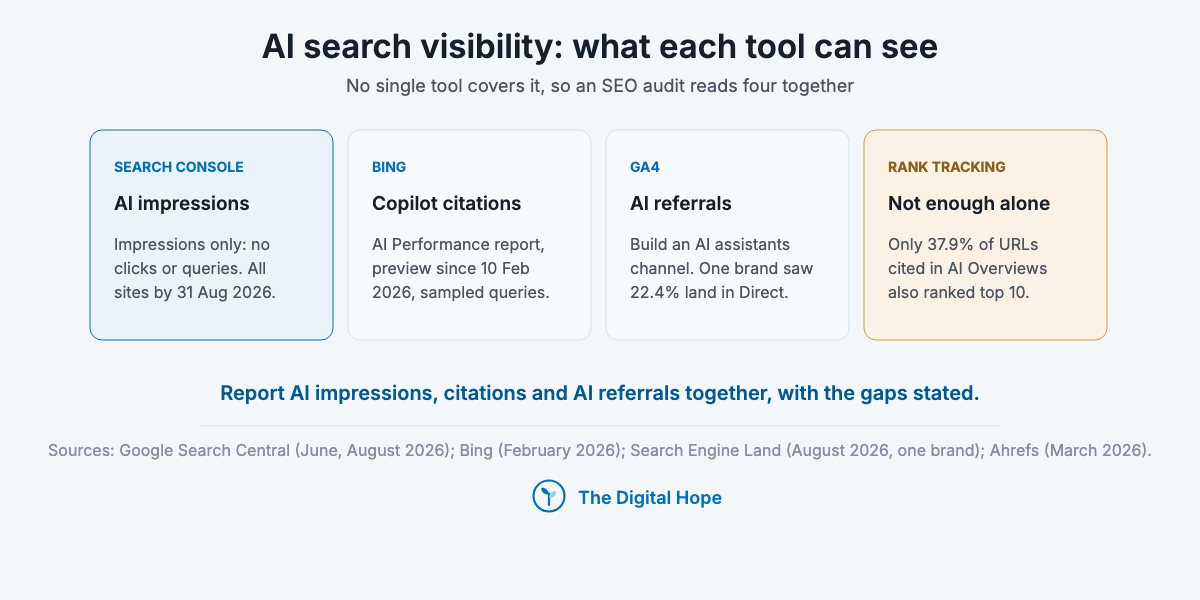
Google now counts AI appearances, and still not AI clicks. Its generative AI performance report (Search Central blog, 3 June 2026, rolled out to all sites worldwide by 31 August 2026) shows how often your URLs appeared in generative AI features in Search and Discover, by page, country, device and date. It shows impressions, not clicks or queries. Clicks from AI Overviews and AI Mode stay inside the ordinary “Web” search type, per Google’s AI features page (updated 10 December 2025).
| What it rules out | Reporting AI visibility from a vendor score alone, and missing Copilot entirely |
| How to check | Export AI impressions by page from Search Console. In Bing Webmaster Tools, read AI Performance for citations by page and the sample of grounding queries |
| Tools | Search Console generative AI report, Bing Webmaster Tools AI Performance, a prompt-tracking tool |
| Act when | Pages that lost clicks gained AI impressions: the visibility moved, it didn’t vanish |
Bing counts citations. Its AI Performance report (public preview since 10 February 2026) counts how often your pages are cited in Copilot and Bing’s AI summaries, from a sample of grounding queries. The announcement doesn’t describe click data.
Rankings and citations don’t move together. In Ahrefs’ March 2026 data, only 37.9% of URLs cited in AI Overviews also ranked in the top 10 for the same query. An audit that checks rankings alone misses most of where AI answers draw from.
The stack I use for AI search measurement: PromptWatch for prompt tracking and citations, Search Console for AI impressions, Bing Webmaster Tools for Copilot, and GA4 for AI referral visits. No single tool covers it.
Who it’s for: B2B brands and publishers whose buyers or readers research in AI Overviews, AI Mode, ChatGPT, Perplexity or Copilot.
In practice: If you pay for a prompt-tracking tool, treat its numbers as samples. Answers vary from run to run, and Google’s AI optimization guide (updated 10 July 2026) warns that third-party tools have no access to its internal metrics. The wider strategy is in how AI is changing SEO.
Verdict: Report impressions and citations together.
14. Build an AI assistants channel in GA4, and check what hides in Direct
GA4 sorts assistant referrals into Referral unless you tell it otherwise. Google’s custom channel groups documentation (Google Analytics Help, opened 29 October 2026) gives an “AI assistants” channel as its own example: a regex match on assistant sources, ordered above Referrals. A standard property gets two custom channel groups, and they apply to past data retroactively.
| What it rules out | AI referral traffic scattered across Referral and Direct, invisible in the channel report |
| How to check | Create the custom channel group, then compare its trend with Search Console AI impressions for the same pages |
| Tools | GA4 Admin (Channel groups), GA4 Traffic acquisition, Search Console |
| Act when | AI impressions rise while the AI channel stays flat: look in Direct for the same landing pages |
Referrers miss part of it. One practitioner tracking a single transportation brand (Search Engine Land, 18 August 2026, with 51,200 events from September 2025 to June 2026) found 22.4% of AI Overview visits attributed to Direct instead of Organic. One brand, and the method also fires on featured snippets, so treat it as a sign of the leak, not its size on your site. The regex needs maintaining as assistants change their referrers.
Who it’s for: Any team that reports organic performance to leadership, and above all for B2B teams whose buyers research in assistants.
In practice: Lead the report with clicks to pages that convert, non-branded demand and conversions, and show AI impressions, citations and the AI channel beside them, with every measurement break from check 1 annotated. Organic sessions alone now undercount what search does.
Verdict: Measure the leak, then report around it.
Quick Summary
Q: How do I measure AI search visibility in an SEO audit?
A: Use Search Console’s generative AI report for impressions (it shows no clicks), Bing Webmaster Tools’ AI Performance for Copilot citations, a prompt-tracking tool as a sample, and a GA4 custom channel group for AI assistant referrals, checking Direct for visits that arrive without a referrer.
Insight
“There are no additional requirements to appear in AI Overviews or AI Mode, nor other special optimizations necessary.”
Google Search Central, AI features and your website, last updated 10 December 2025.
All 14 checks side by side
| Check | What it rules out | Check in | Act when |
|---|---|---|---|
| 1. Drop is real | A reporting or consent artefact | Search Console, GA4, tracker | Search Console holds while others fall |
| 2. Clicks vs impressions | A site fix for a results-page change | Performance report | Only clicks fell |
| 3. Date vs dashboard | Wrong cause: update or release | Status Dashboard, deploy log | Drop starts in a rollout window or on a release |
| 4. Manual and security | A penalty or a hack | Security and manual actions | Any issue listed |
| 5. Page indexing | Templates leaving the index | Page indexing report | One template’s not-indexed count jumps |
| 6. robots.txt and AI bots | A blocked search bot | robots.txt, CDN rules | A search bot you want is blocked |
| 7. Server logs | Uncrawled sections, fake Googlebots | Access logs, Crawl Stats | Key directories get no crawler hits |
| 8. Rendering | Content or links only after JavaScript | Crawler, JS off vs on | Content or links missing in the raw crawl |
| 9. Canonicals | Split or wrong URLs | URL Inspection | Google overrules your canonical |
| 10. Thin and scaled pages | Spam-policy exposure | Page export by template | Template mostly zero-click and generic |
| 11. Links | Bought or unqualified links | Crawler, Links report | Paid link without rel=”sponsored” |
| 12. Core Web Vitals | A failing template | Core Web Vitals report | Ranking template in the poor band |
| 13. AI impressions | Visibility moved, not lost | Search Console AI report, Bing | Clicks fell, AI impressions rose |
| 14. AI referrals | AI visits hidden in Referral or Direct | GA4 channel groups | AI channel flat while impressions rise |
What to check first, by situation
The order above is the default. Five common situations change where you start:
- If traffic fell sitewide on one day: run checks 1, 3 and 4 first. If the date sits inside a core or spam update and both reports are clean, go to check 10, and set an honest timeline of months, not weeks.
- If clicks fell but impressions held: check 2, then 13. The listing may still show while an AI Overview answers the query above it.
- If one page type fell and the rest held: check 5, then 8 and 9 for that template. A template-level drop is almost never a sitewide quality call.
- If you run a site under about a thousand pages: skip check 7’s Crawl Stats work, which Google says such sites likely don’t need. Spend the time on checks 2, 10 and 11.
- If leadership asks how much AI search sends you: checks 13 and 14, reported together, with the gaps stated. No tool gives one number yet.
For page-by-page fixes once the audit points at a page type, use our on-page SEO guide.
Quick Summary
Q: In what order should an SEO audit run?
A: Measurement first (is the drop real, what shape, what date, any manual action), then access (indexing, crawler controls, logs, rendering, canonicals), then quality (thin and scaled pages, links, Core Web Vitals), then AI visibility measurement. Start elsewhere only when the situation points there, such as a single template falling.
How often to run it
Run the full audit when something moves, and a short one on a schedule. A monthly pass over checks 1, 4, 5 and 13 catches the cheap problems early. The full fourteen belong after a sitewide drop, before and after a migration or redesign, after a CMS, CDN or consent change, and after any announced core or spam update has finished rolling out.
Bigger sites need more of it. A site above the crawl budget guide’s thresholds, or one publishing templated pages every day, should read logs and Page indexing weekly, because a template can fall out of the index between monthly checks.
What stopped being true
These were standard audit items and stopped holding on dates you can check. None of them belongs in a current audit.
| What | When | Primary source |
|---|---|---|
| Bounce rate and goals in Universal Analytics as audit KPIs | UA stopped processing 1 July 2023, all access ended 1 July 2024 | Google Analytics Help |
| Google’s Mobile-Friendly Test and the Mobile Usability report | Retired from 1 December 2023 (mobile usability still counts: check it in Lighthouse) | Google Search Central blog, 19 April 2023 |
| First Input Delay as a Core Web Vital | Replaced by INP on 12 March 2024 | web.dev, 12 March 2024 |
| A separate “Helpful Content Update” to diagnose against | Folded into core ranking on 5 March 2024 | Google Search Central, helpful content system page |
| Search Console’s URL Parameters tool | Removed one month after its 28 March 2022 announcement | Google Search Central blog, 28 March 2022 |
| Bought links either work or bring a manual penalty | SpamBrain neutralises bought and passed links from December 2022 | Google Search Central blog, 14 December 2022 |
| Domain Authority as a target or a ranking factor | Never Google’s: a Moz score, which Moz says Google doesn’t use | Moz, compiled by Search Engine Journal, January 2023 |
| A page load time target such as “under 2 seconds” as Google’s measure | Google’s measure is Core Web Vitals field data, with no single page experience signal | Google page experience documentation, updated 22 September 2026 |
| Keyword density targets and word-count minimums | Google says content length alone doesn’t matter for ranking | Google SEO starter guide, updated 10 December 2025 |
| Year-on-year impressions as a like-for-like trend | Desktop impressions fell when the 100-results parameter stopped working, mid-September 2025 | Search Engine Roundtable, September 2025 |
| Rank trackers as a mirror of Google | Vendors reported inaccurate collected results from October 2026 | Search Engine Land, 27 October 2026 |
| Search Console showing AI search traffic separately | AI Overview and AI Mode clicks sit inside “Web”, and the AI report shows impressions only | Google Search Central, June and August 2026 |
Frequently asked questions
What is an SEO audit? An SEO audit is a structured check of whether search engines and AI crawlers can reach, index and trust a site’s pages, and whether the measurement says what you think it says. In 2026 it covers Search Console, GA4, a site crawl, server logs and AI visibility reports.
How often should I run an SEO audit? A short pass monthly and a full audit when something moves: a sitewide drop, a migration, a platform or consent change, or a finished core or spam update. Large sites publishing daily should check indexing and logs weekly.
Is every traffic drop after a Google update a penalty? No. A penalty in Google’s terms is a manual action, and it appears in Search Console’s Manual actions report. A drop after a core update with no manual action is a ranking reassessment, and Google says recovery can take several months with no guarantee.
Can a free audit tool’s site score replace this checklist? No. A tool’s health score is that vendor’s own weighting of its own checks, and it can’t see your Search Console data, your logs or your consent setup. Use crawlers to find issues, and Google’s own reports to judge them.
Should I delete thin pages? It depends on scale. Google calls deleting content a last resort, which fits a small site with unique pages. On a large site where one template produced thousands of near-empty URLs, removing or consolidating that template is often the first step.
Do AI Overviews need a separate audit? Not for eligibility: Google says a page needs to be indexed and snippet-eligible, with no extra requirements. Measurement is the part that differs, which is why checks 13 and 14 exist.
The verdict
Check the measurement before the site, and the site before the content. My read: the expensive audit mistakes come from skipping that order: a reporting artefact read as a ranking loss, a blocked search bot read as an AI penalty, a template problem read as a quality problem.
For a small site, checks 1 to 4, 10 and 11 carry most of the weight. For a large templated site, checks 5, 7, 8 and 10 do. Expect months, not weeks, for any recovery that depends on Google reassessing the site, and some don’t recover at all. What would change this order: Google adding AI clicks to Search Console, which would move checks 13 and 14 up, or AI crawlers starting to render JavaScript, which would move check 8 down.
If you’d rather have someone run this audit on your Search Console, logs and templates with you, that’s what I do in a consultation.
About this article

Written by
Sai Subramaniam
SEO, GEO and Paid Ads Manager · 8+ years in growth marketing
I have run SEO, paid media and ABM for B2B AI companies, consumer apps and live-entertainment brands, from a solo operator at an AI infrastructure company to a team of 20 recovering a million-visitor site after a Google update. I write these guides from that work, and every number in them carries its source.
See my portfolioConnect on LinkedInHow this one was checked. Every number traces to a named source with its dataset and period, and every platform feature, policy or limit cites the platform’s own documentation with the date it was verified. Where the author’s own results appear, they are labelled as one account’s results, with the budget and context, not as a rule.
No affiliate links and no paid placements. Tools are named because they are what practitioners use, not because anyone paid to appear here.
Reviewed: October 2026. Ad platforms and search features change every few months; anything we could not verify at the time of writing is marked as unverified rather than turned into a number.
Corrections. If something here is wrong or has changed since, we would rather know. Corrections are made in place, with a note saying what changed.