
“Google doesn’t guarantee that all pages everywhere will make it into the Google index.”
Google Search Console Help, Page indexing report (checked 29 Oct 2026)
Last updated: October 2026.
You published the page, it’s in the sitemap, and Search Console says “Crawled, currently not indexed”. Or the page is indexed, but ChatGPT and Perplexity never cite it, because the copy they fetched was an empty JavaScript shell. Neither problem shows up in a content review. Both are technical SEO.
Technical SEO is the work that gets the right pages through a pipeline: crawled, rendered, indexed, then ranked or cited. Google describes its own processing of JavaScript pages in three phases, crawling, rendering and indexing (JavaScript SEO basics, updated 4 Mar 2026). Every AI answer engine now runs its own crawler in front of the same pipeline, and most of them skip the rendering step. A page that fails at any stage never reaches the next one.
This guide follows the pipeline stage by stage: how crawlers work, which problems cost traffic at which site size, then crawling, AI crawlers, rendering, indexing, architecture, Core Web Vitals and mobile, structured data, international sites, migrations, log files, WordPress, and a five-step audit. It means search-facing work only. Conversion work on landing pages is a separate job and is not covered here.
How we know
Sources: Google Search Central documentation (crawl budget, JavaScript, robots.txt, canonicals, hreflang, site moves, structured data, mobile-first indexing, page experience), Search Console Help, web.dev, and the crawler documentation of OpenAI, Anthropic, Perplexity and Apple, each opened on 29 Oct 2026 with its last-updated date stated in the text.
Studies: Vercel and MERJ’s AI crawler analysis (Dec 2024, hundreds of millions of fetches, dated), one controlled 2,400-page JavaScript link test (Search Engine Land, Aug 2026, one site), HTTP Archive’s Web Almanac CMS chapters (2024 and 2025 editions, millions of mobile sites with Chrome field data).
First-party: three labelled examples from accounts I ran, n=1 each.
The limit: Google documents what its systems use, not how much each technical fix is worth. Nothing here shows that a given fix moves rankings by a set amount.
Quick Digest
– The pipeline: crawl, render, index, then rank or cite. Fix the earliest broken stage first.
– Most sites don’t have a crawl budget problem: Google’s guide is for 1M+ page sites or 10,000+ page sites changing daily (Jul 2026).
– AI crawlers mostly don’t run JavaScript: main copy and internal links belong in the initial HTML.
– robots.txt controls crawling, not indexing: use noindex to keep a page out of Google.
– Block by purpose: GPTBot, ClaudeBot, Google-Extended and Applebot-Extended are training controls. OAI-SearchBot, Claude-SearchBot and PerplexityBot decide AI search visibility.
– Core Web Vitals: LCP 2.5 s, INP 200 ms, CLS 0.1, at the 75th percentile of real visits.
– One table near the end lists the technical advice that stopped being true, with dates.
How search engines and AI crawlers process a site: crawl, render, index
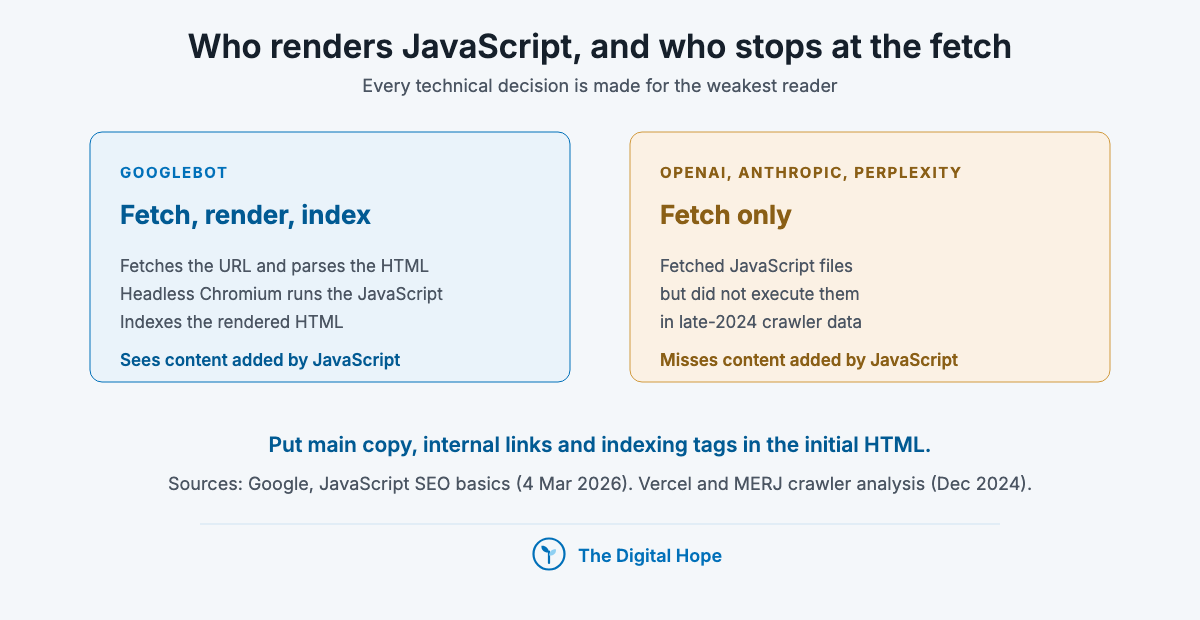
A crawler fetches a URL, a renderer runs its JavaScript, an indexer decides whether to keep it. Googlebot first fetches the URL and parses the HTML for links. Pages that return a 200 status go into a rendering queue, where a headless Chromium executes the JavaScript. Google then indexes the rendered HTML (JavaScript SEO basics, updated 4 Mar 2026). Ranking, and now citation in AI answers, only happens to what made it into an index.
AI engines add crawlers, and most of them stop at the first stage. In Vercel and MERJ’s analysis of crawler traffic across its network (December 2024, GPTBot alone made 569 million fetches in a month), OpenAI’s, Anthropic’s and Perplexity’s crawlers fetched JavaScript files but did not execute them. Gemini uses Google’s rendering. That is late-2024 data, but a 2026 test pointed the same way (see the rendering section).
Each engine has its own crawlers, and each crawler has one job. Blocking the wrong one is the most common technical mistake of the AI era, because the names don’t say what they do.
| Crawler or token | Company | What it does | Block it and you lose |
|---|---|---|---|
| Googlebot | Crawls for Google Search, which includes AI Overviews and AI Mode | Google Search, all of it | |
| Google-Extended | A robots.txt token, not a separate crawler, for Gemini training and grounding | Gemini use only. Google says it does not affect inclusion in Search (common crawlers doc, 15 Oct 2026) | |
| Bingbot | Microsoft | Fills Bing’s index, which grounds Copilot | Bing and Copilot |
| OAI-SearchBot | OpenAI | Builds the index for ChatGPT search | Appearing in ChatGPT search answers |
| GPTBot | OpenAI | Collects content for model training | Training use only |
| ChatGPT-User | OpenAI | Fetches a page when a user asks. OpenAI says “robots.txt rules may not apply” | Little, by design |
| Claude-SearchBot | Anthropic | Indexes content for Claude’s search results | Visibility in Claude search answers |
| ClaudeBot | Anthropic | Collects content that may be used for training | Training use only |
| Claude-User | Anthropic | Fetches a page when a Claude user asks | Retrieval for user questions |
| PerplexityBot | Perplexity | Surfaces and links sites, not used for training | Perplexity answers |
| Applebot-Extended | Apple | A robots.txt token, not a crawler, for Apple’s AI model training | Training use only. Apple says rules for it “are not considered in ranking for Search” (4 Sep 2026) |
Sources: OpenAI crawler docs, Anthropic help centre (updated 7 Apr 2026), Perplexity crawler docs, Apple support (4 Sep 2026), Google common crawlers (15 Oct 2026), all checked 29 Oct 2026.
My read: technical SEO used to have one customer, Googlebot. It now has a dozen, and only one of them renders the way Google does. Every decision below is made for the weakest reader in that table.
Quick Summary
Q: How do search engines and AI crawlers process a website?
A: In stages. A crawler fetches the URL, a renderer runs its JavaScript, and an indexer decides whether to keep the page. Google renders with headless Chromium. Most AI crawlers, from OpenAI, Anthropic and Perplexity, did not execute JavaScript in Vercel’s December 2024 data, so content that only appears after rendering is invisible to them.
Insight
Not every AI fetch obeys robots.txt. OpenAI says its ChatGPT-User agent, which fetches pages on a user’s request, may not follow robots.txt rules, and Perplexity says the same of Perplexity-User. Robots.txt governs the crawlers that build each index, not every request an assistant makes on a person’s behalf.
OpenAI and Perplexity crawler documentation, checked 29 Oct 2026
Which technical problems cost traffic, by site size
“Medium or larger sites (10,000+ unique pages) with very rapidly changing content (daily)”
Google Search Central, “Large site owner’s guide to managing your crawl budget”, one of the site types it is written for (last updated 22 Jul 2026)
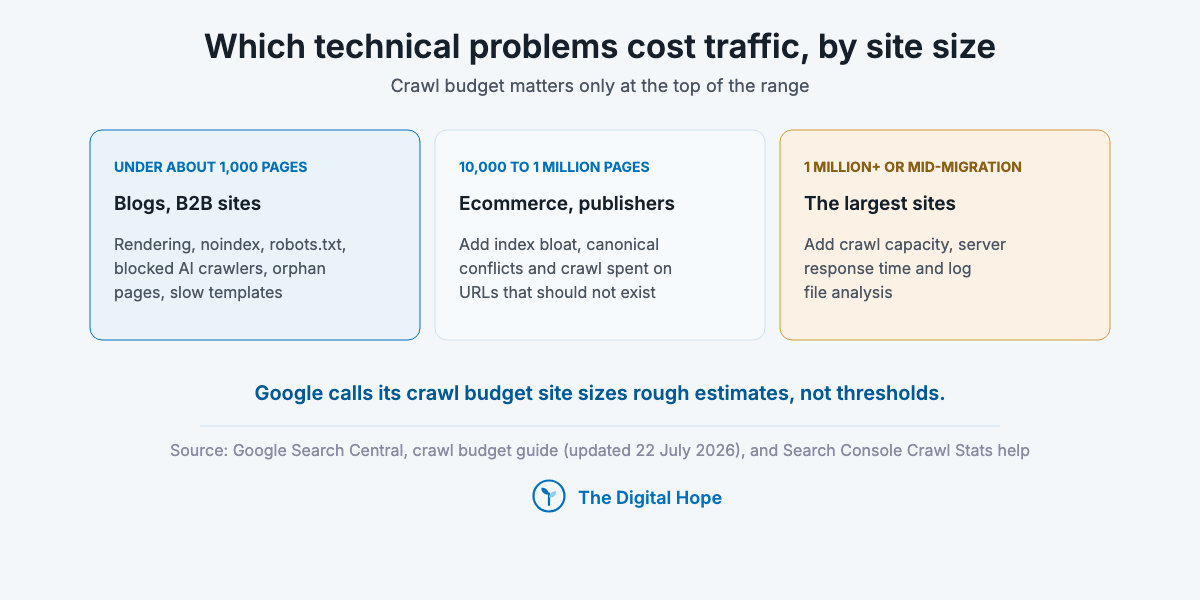
The technical work worth doing depends on how many URLs you have and how they’re built. Google’s crawl budget guide is written for three kinds of site: 1 million+ unique pages changing about weekly, 10,000+ pages changing daily, or sites where a large share of URLs sits in “Discovered, currently not indexed”. Google calls those numbers rough estimates, not thresholds (updated 22 Jul 2026). Search Console’s Crawl Stats report says a site with fewer than a thousand pages should not need it at all.
So split the work by condition:
- Under about 1,000 pages (a blog, a services site, a B2B marketing site): crawl budget is not your problem. What breaks is rendering, accidental noindex, robots.txt mistakes, blocked AI crawlers, orphan pages and slow templates.
- 10,000 to 1 million pages (ecommerce, marketplaces, publishers, programmatic pages): add index bloat from filters, parameters and thin templates, canonical conflicts, and crawl spent on URLs that should not exist.
- 1 million+ pages, or any site mid-migration: everything above, plus crawl capacity, server response time and log file analysis, because you can’t see crawl waste at this size any other way.
One example from the middle-to-large band. At Zolvit (Vakilsearch), a legal services site with 500K+ pages where I led SEO from July to December 2024 [FIRST-PARTY, n=1], the work after a Google update started with index hygiene at scale: we audited 10,000+ blog posts, deleted thin pages first, and moved a large judgments section off the main domain to a separate one, which was later shut. Organic traffic went from about 400K to 700K monthly visits in six months. It is one site, the exact update is unknown (a core or a spam update), and content work ran at the same time, so this does not show which change did what. The full story is on my portfolio.
Size first, tactics second.
Quick Summary
Q: Does every website need technical SEO?
A: Every site needs the basics: crawlable HTML, correct indexing signals, open access for the crawlers you want, and acceptable Core Web Vitals. Crawl budget work matters only for the largest or fastest-changing sites. Google’s guide targets 1M+ pages changing weekly or 10,000+ pages changing daily (Jul 2026).
Insight
“Discovered, currently not indexed” is the one crawl budget symptom a small site can see. Google’s guide names a large share of URLs in that state as a reason to read it, whatever the site’s size. If that bucket holds a handful of URLs, ignore it. If it holds most of the site, crawl demand or crawl capacity is the issue.
Google Search Central, crawl budget guide (updated 22 Jul 2026)
Here is how to work through the pipeline on your own site, one stage at a time.
Crawling: robots.txt, sitemaps and crawl budget
“it is not a mechanism for keeping a web page out of Google.”
Google Search Central, Introduction to robots.txt (last updated 10 Dec 2025)
robots.txt decides what a crawler may fetch. It does not decide what gets indexed. Google’s robots.txt introduction says a disallowed URL can still be indexed if other sites link to it, and shows up without a description. To keep a page out of Google, use a noindex tag or put it behind a password (updated 10 Dec 2025).
First action: open yoursite.com/robots.txt and read every Disallow line aloud. For each one, say which crawler it applies to and why. Rules nobody can explain are the ones that hide pages.
What robots.txt is for:
- Keeping crawlers out of infinite or useless URL spaces: internal search results, faceted filter combinations, cart and session URLs.
- Saving crawl on a large site. Google’s crawl budget guide says robots.txt, not noindex, is the tool for this, because Google still requests a noindexed page before dropping it (updated 22 Jul 2026).
- Per-crawler decisions for AI bots, covered in the next section.
What it is not for: de-indexing pages, hiding private content, or blocking pages you also tagged noindex. A page blocked in robots.txt can’t show Googlebot its noindex tag, so the two together keep a URL half-alive in the index.
Sitemaps list the URLs you want indexed, nothing else. Put only canonical, indexable, 200-status URLs in them. Google calls a sitemap a weak canonical signal and a redirect or rel=canonical a strong one (canonicalization doc, updated 10 Jul 2026), so a sitemap full of redirected or parameter URLs sends mixed signals for no gain. Submit it in Search Console and reference it in robots.txt.
Crawl budget, if you’re in the large-site band. Google splits it into crawl capacity (how much server time Google is willing to use, which rises and falls with your site’s health) and crawl demand (how much it wants your URLs, based on size, freshness, quality and popularity). The levers are the crawl budget guide’s own: consolidate duplicates, block URLs that should never be crawled, return 404 or 410 for removed pages, fix soft 404s, keep sitemaps current, avoid long redirect chains, and keep the server fast. Don’t use robots.txt to shuffle budget temporarily between sections, which the guide warns against.
- Can someone on the team explain every Disallow rule?
- Does any sitemap contain a URL that redirects, 404s or carries noindex?
- Is any page both disallowed and tagged noindex?
Read the file before you touch it.
Quick Summary
Q: Does robots.txt stop a page from being indexed?
A: No. Google says robots.txt is not a mechanism for keeping a page out of Google, and a disallowed URL can still be indexed from links. Use a noindex tag, and leave the page crawlable so Google can see it. Use robots.txt to stop crawling of useless URL spaces and, on large sites, to save crawl.
Insight
On a large site the cheapest crawl saving is a status code. Google’s crawl budget guide asks for a 404 or 410 on permanently removed pages rather than a redirect to an unrelated page, and for soft 404s to be fixed, because a page that answers 200 with “not found” keeps getting re-crawled.
Google Search Central, crawl budget guide (updated 22 Jul 2026)
AI crawlers and robots.txt: GPTBot, Google-Extended and the rest
“Webpages that disallow Applebot-Extended can still be included in search results.”
Apple Support, About Applebot (published 4 Sep 2026)
Decide per crawler, by purpose: training or search. Every major AI company now separates the crawler that feeds model training from the one that feeds its answer engine. Blocking a training crawler costs you nothing in that company’s search product. Blocking its search crawler removes you from it.
First action: list every user-agent your robots.txt names. Then mark each as training, search or user fetch using the crawler table above, and confirm that every block matches what the business decided.
| If you want to | Disallow | Leave open |
|---|---|---|
| Be cited in ChatGPT search but stay out of OpenAI training | GPTBot | OAI-SearchBot |
| Be cited in Claude but stay out of Anthropic training | ClaudeBot | Claude-SearchBot, Claude-User |
| Stay out of Gemini training and grounding, keep Google Search | Google-Extended | Googlebot |
| Stay out of Apple AI training, keep Apple search features | Applebot-Extended | Applebot |
| Appear in Perplexity answers | nothing | PerplexityBot |
| Appear in Copilot answers | nothing | Bingbot |
Three facts change most robots.txt decisions:
- Google-Extended does not remove you from AI Overviews or Search. Google’s common crawlers page says it does not affect inclusion in Google Search and is not a ranking signal (updated 15 Oct 2026). To limit what Google’s AI features show from a page, Google points to snippet controls such as nosnippet and max-snippet.
- OAI-SearchBot, not GPTBot, controls ChatGPT search. OpenAI’s crawler documentation says blocking OAI-SearchBot removes a site from ChatGPT search answers, while GPTBot covers training (checked 29 Oct 2026).
- Fetchers acting on a user’s request may ignore the file. OpenAI says robots.txt “may not apply” to ChatGPT-User, and Perplexity says Perplexity-User generally ignores it.
The condition. If you sell the content itself (a publisher, a data provider, a paywalled course), blocking the training crawlers is a reasonable business call. If you’re a B2B company or a brand that wants to be named in AI answers, keep every search crawler open and put your effort into the next section. How AI visibility is earned and measured is in the GEO guide.
- Who in the business decided our AI crawler policy, and when?
- Does any rule block a search crawler we want citations from?
- Did a CDN or security plugin add bot blocking that robots.txt doesn’t show?
Block training if you must. Never block search by accident.
Quick Summary
Q: Should I block GPTBot and Google-Extended in robots.txt?
A: Only if you don’t want your content used for AI training. Blocking GPTBot does not remove you from ChatGPT search (OAI-SearchBot controls that), and blocking Google-Extended does not remove you from Google Search or AI Overviews (Google, Oct 2026). Block the training tokens, keep the search crawlers open, if you want AI citations.
Insight
Anthropic warns that blocking its crawlers by IP address is not a reliable opt-out, because it can stop the bots from reading robots.txt at all. The same logic applies to firewall and CDN bot rules: a block at the network edge overrides the file you think is in charge, so check both.
Anthropic help centre, crawler article (updated 7 Apr 2026)
Rendering JavaScript: put content and links in the initial HTML
“server-side or pre-rendering is still a great idea”
Google Search Central, JavaScript SEO basics (last updated 4 Mar 2026)
If your main copy or internal links only exist after JavaScript runs, assume most AI crawlers never see them. Google renders JavaScript, though rendering is a separate, later step. Most AI crawlers didn’t render it at all in late-2024 data. Google’s own guide still recommends server-side rendering or pre-rendering, because it’s faster for users and crawlers and not every bot runs JavaScript.
First action: open a key page, switch JavaScript off in Chrome DevTools (or view the raw page source, not the inspected DOM), and check two things: is the main copy there, and are the internal links real a elements with an href? What you see now is roughly what GPTBot sees.
The evidence that this matters now. In a controlled test on one 2,400-page directory site (Search Engine Land, August 2026), half the internal links were hard-coded HTML and half were injected by JavaScript. GPTBot crawled all 759 HTML-linked pages on day one and none of the JavaScript-linked hierarchy. ClaudeBot, PerplexityBot and Bingbot found no JavaScript-linked pages either. It’s one site over 27 days, so read it as a direction, not a rate.
What to fix, in order:
1. Render the main content and navigation on the server (SSR, static generation or pre-rendering) for every page you want found. Most modern frameworks offer this as a setting.
2. Use real links. Google’s link documentation says a link is crawlable when it’s an a element with an href. Click handlers on spans and buttons are not links.
3. Don’t let JavaScript change indexing signals. Google’s JavaScript SEO guide warns that Google may skip rendering when it meets a noindex tag, so removing noindex with JavaScript may not work. Ship the right robots tag, canonical and title in the initial HTML.
4. Return real status codes. A single-page app that shows “not found” with a 200 status creates soft 404s. Google suggests a noindex robots tag added by JavaScript on such error views if a real 404 is impossible.
When to skip it: logged-in app screens, dashboards and checkout steps have no search value. Leave them client-side.
- Does the main copy of our top 20 pages appear with JavaScript off?
- Are our menus, breadcrumbs and related-post links real a href links?
- Is any noindex, canonical or title set only by JavaScript?
View source before you buy a rendering tool.
Quick Summary
Q: Can Google and AI crawlers read JavaScript content?
A: Google renders JavaScript in a separate step with headless Chromium. Most AI crawlers did not execute JavaScript in Vercel’s December 2024 data, and in a 2026 single-site test none followed JavaScript-injected links. Put main content, internal links and indexing tags in the server-rendered HTML.
Insight
Rendering is where a technical SEO problem becomes invisible to a content team. The writer sees a finished page in the browser, the CMS shows it as published, and the crawler receives a script tag. In the 2026 test, Googlebot had reached only 5% of the HTML-linked pages and 2% of the JavaScript-linked ones in 27 days, so even Google was slow on a new site.
Search Engine Land, Vinicius Stanula’s crawler test (19 Aug 2026)
Indexing and canonicals: decide which URL represents each page
“your site will likely do just fine without specifying a canonical preference”
Google Search Central, “How to specify a canonical URL” (last updated 10 Jul 2026)
Indexing is Google’s decision, made per URL, and the Page indexing report shows you every decision. Google states it doesn’t index every crawlable page. “Crawled, currently not indexed” means Google fetched the page and chose not to keep it, and resubmitting changes nothing. “Discovered, currently not indexed” means the crawl was postponed (Search Console Help, checked 29 Oct 2026).
First action: in Search Console, open Indexing, then Pages. Sort the “Why pages aren’t indexed” table by count and open the top three reasons. For each, sample ten URLs and sort them into “should be indexed” and “should not exist”.
Read the reasons as three groups:
- You told Google not to index it (excluded by noindex, blocked by robots.txt, alternate page with proper canonical). Fine, if intended. Check the sample.
- Google picked a different URL (duplicate without user-selected canonical, Google chose a different canonical than the user). Your canonical signals disagree with each other.
- Google chose not to (crawled or discovered, currently not indexed). Usually a quality or duplication judgment on thin or near-identical pages, sometimes a crawl demand issue on large sites.
Canonicals are a strong hint, not a command. Google calls a redirect and rel=canonical strong signals, and a sitemap a weak one, and says a small site will likely do fine without declaring any canonical preference (updated 10 Jul 2026). On a large or templated site, declare one and make every signal agree: the canonical tag, internal links, the sitemap and any hreflang all point at the same URL. Common conflicts are http and https, www and non-www, trailing slashes, uppercase paths, tracking parameters and filter combinations.
Before you noindex or delete, decide by condition. On a large site with many low-value templated pages, removing or consolidating them is often the fix. On a small site with thin but unique posts, improving or merging them is usually better than deleting. The page-level side of this is in the on-page SEO guide.
- What share of our indexed pages would we be happy to show a buyer?
- Do our canonical tag, internal links and sitemap point at the same URL for each page?
- Which “not indexed” reason has grown fastest in the last three months?
Sample ten URLs before deciding anything.
Quick Summary
Q: Why is my page crawled but not indexed?
A: Google fetched it and decided not to index it, which Search Console reports as “Crawled, currently not indexed”. Google does not index every page and resubmitting doesn’t change the decision. Check whether the page duplicates another, adds little, or sends conflicting canonical signals, then improve, merge or remove it.
Insight
A canonical tag can’t fix a duplicate your own site keeps linking to. Google weighs redirects and canonical tags strongly and sitemaps weakly, but internal links tell it which URL you treat as the real one hundreds of times over. Fix the links in the template, and the canonical tag usually stops being contested.
Google Search Central, canonicalization documentation (updated 10 Jul 2026)
Site architecture and internal linking: every page you care about, a few clicks from home
“Good anchor text is descriptive, reasonably concise, and relevant to the page that it’s on and to the page it links to”
Google Search Central, “Link best practices for Google” (last updated 10 Dec 2025)
Internal links are how crawlers find pages and how you tell them which pages matter. Google’s link documentation asks that every page you care about is linked from at least one other page on the site. Orphan pages, reachable only from a sitemap, get discovered late and crawled rarely. AI crawlers are less patient than Google, as the rendering test showed.
First action: crawl the site with any desktop crawler, export pages by click depth and by inlink count, then compare that list with your sitemap. Every sitemap URL with zero internal links is an orphan. Every money page deeper than four clicks is a candidate for a better link.
What a sound architecture looks like:
- Shallow and grouped by topic. Home, then category or hub pages, then detail pages. A hub that links to every page in a topic cluster, and pages in the cluster that link back and to each other, is the structure both crawlers and readers follow.
- Readable, stable URLs. Google recommends words over IDs and hyphens over underscores (URL structure doc, updated 21 Oct 2026). Change URLs only when you have to, because every change is a small migration.
- Breadcrumbs that are real links, on every page below the top level.
- Descriptive anchor text in body copy, not “click here”. Navigation and footer links count, but contextual links say more about the target.
- Pagination with plain linked pages, so items on page five are reachable without JavaScript.
The condition: if you run a 50-page site, this is an afternoon’s work. If you run a 50,000-page catalogue, it’s a template decision: fix the category template and the related-items module, not individual links.
- Which of our ten most valuable pages have the fewest internal links?
- Can a crawler reach page five of every listing without running JavaScript?
- Does each topic we want to be known for have a hub page?
Link to what earns money first.
Quick Summary
Q: What is good site architecture for SEO?
A: A shallow structure grouped by topic, where every page you care about is linked from at least one other page, important pages sit a few clicks from the home page, URLs are readable and stable, and links are plain HTML with descriptive anchor text. Orphan pages found only through a sitemap are crawled late and rarely.
Insight
Internal links are the one ranking input on this page you fully control. Google’s link guidance asks for anchor text that describes the target, and for every page that matters to be linked from somewhere on the site. On most sites the fastest technical gain is adding contextual links from strong pages to the pages that should be earning money.
Google Search Central, link best practices (updated 10 Dec 2025)
Core Web Vitals and mobile: measured on real users, judged on the phone
“Core Web Vitals are used by our ranking systems.”
Google Search Central, Understanding page experience (last updated 22 Sep 2026)
Core Web Vitals count, but as part of page experience, not a single switch. Google’s page experience documentation says Core Web Vitals are used by its ranking systems and that there is no single page experience signal (updated 22 Sep 2026). Treat them as a floor to clear, especially when competing pages are equally good, not as a growth lever.
The three metrics and their “good” thresholds, measured at the 75th percentile of page loads, split by mobile and desktop (web.dev):
| Metric | Measures | Good | What usually breaks it |
|---|---|---|---|
| Largest Contentful Paint (LCP) | Loading: when the main content appears | 2.5 seconds or less | Slow server response, a large unoptimised hero image, render-blocking CSS and fonts |
| Interaction to Next Paint (INP) | Responsiveness: delay after every tap, click or key press | 200 milliseconds or less | Heavy JavaScript on the main thread: tag managers, chat widgets, sliders, third-party scripts |
| Cumulative Layout Shift (CLS) | Visual stability: how much the page jumps | 0.1 or less | Images and ads without set dimensions, late-loading banners, font swaps |
INP replaced First Input Delay as a Core Web Vital on 12 March 2024 (web.dev). FID measured only the first interaction. INP measures every one, so sites that passed easily before can fail now.
First action: in Search Console, open Core Web Vitals and read the mobile report first. It groups URLs by template, so one failing group usually means one template to fix. Then run PageSpeed Insights on one URL from each failing group. Field data (from real Chrome users) is what counts. Lighthouse lab scores are for diagnosis.
Mobile is the version Google indexes. Google uses the mobile version of a site’s content, crawled with the smartphone agent, for indexing and ranking (mobile-first indexing doc, updated 10 Dec 2025). So:
- Same primary content on mobile and desktop. Use tabs or accordions instead of cutting copy on mobile.
- Same structured data and the same robots meta tags on both versions. A noindex on mobile only is a noindex.
- Don’t lazy-load primary content on user interaction. Content that waits for a tap may never be seen.
The condition: for most sites, fixing the worst mobile template group is the whole job. Chasing a perfect lab score on a page that already passes in the field is time better spent elsewhere, unless that page competes with near-identical pages, which is where Google says page experience counts most.
- Which template group fails on mobile, and which metric fails it?
- Which third-party scripts load on every page, and who owns each?
- Does the mobile page carry the same content, schema and robots tags as desktop?
Fix the template, not the page.
Quick Summary
Q: Are Core Web Vitals a ranking factor?
A: Google says Core Web Vitals are used by its ranking systems, but there is no single page experience signal (Sep 2026). Aim for LCP under 2.5 seconds, INP under 200 milliseconds and CLS under 0.1 at the 75th percentile of real mobile visits, and read Search Console’s field data, not lab scores.
Insight
INP is mostly a third-party script problem. Every tag, chat widget and consent banner added by a different team runs on the same main thread, and INP reports one of the slowest responses across the whole visit. Count the scripts that load on every page before blaming the hosting.
My read, using INP’s definition from web.dev (a Core Web Vital since 12 Mar 2024)
Structured data that still earns rich results
“In general, Google recommends using JSON-LD for structured data if your site’s setup allows it.”
Google Search Central, Introduction to structured data markup (last updated 10 Dec 2025)
Structured data earns a place in rich results only for the types Google still supports, and it guarantees nothing. Google’s introduction says markup can make results more engaging, recommends JSON-LD, and warns that markup which breaks its guidelines may be ineligible for rich result display. It does not call structured data a ranking signal. Google’s AI optimization guide adds that structured data isn’t required for generative AI search (updated 10 Jul 2026).
First action: open Google’s search gallery, list the types that match what your pages genuinely contain, then test one URL per template in the Rich Results Test.
Types worth implementing, by site type:
- Every site: Organization (logo and name), WebSite, BreadcrumbList.
- Ecommerce: Product with offers, price, availability and shipping, plus Review and AggregateRating where the reviews are real and on the page.
- Publishers and blogs: Article, with author and dates that match the visible page.
- Local businesses: LocalBusiness with the same name, address and hours as the Business Profile.
- Video, events, recipes, jobs, software apps: their own types, where the page is about that thing.
Rules that keep markup eligible: mark up only what’s visible on the page, keep values in sync with the page (a price in schema that differs from the page is a guideline breach), and fix errors in Search Console’s enhancement reports after each template release.
Skip anything Google has retired. FAQ and HowTo rich results no longer show (details in the table near the end). Adding their markup now is harmless and earns nothing in Google.
- Does each template’s markup match what a visitor sees on the page?
- Which supported type fits our main page type that we haven’t implemented?
- Who checks the enhancement reports after a template release?
Mark up what’s true, then stop.
Quick Summary
Q: Does structured data still help SEO?
A: It makes pages eligible for rich results in the types Google still supports, such as Product, Article, BreadcrumbList, Organization and LocalBusiness. It doesn’t guarantee a rich result, Google doesn’t call it a ranking signal, and Google says it isn’t required for AI search. Use JSON-LD and mark up only what the page shows.
Insight
Rich result types are retired more often than new ones arrive, and Google announces retirements in its documentation changelog. Check that changelog quarterly, because markup for a retired type keeps validating in third-party tools long after Google stops showing it.
Google Search Central documentation updates page (checked 29 Oct 2026)
International SEO and hreflang
“If two pages don’t both point to each other, the tags will be ignored.”
Google Search Central, “Tell Google about localized versions of your page” (last updated 21 Sep 2026)
hreflang tells Google which language or regional version of a page to show which searcher. It only works when every version lists every other version, and itself. Google’s localized versions guide accepts the annotations in HTML, in HTTP headers or in a sitemap, and treats the three as equivalent (updated 21 Sep 2026).
First action: pick one page that exists in several languages or countries. Open each version and check that each lists itself and all the others, with the same set of URLs, and that every listed URL returns 200 and is canonical.
The rules that catch most sites:
- Return links are mandatory. If page A lists page B and B doesn’t list A, Google ignores the pair.
- Codes are ISO 639-1 for language and ISO 3166-1 Alpha 2 for region: en-gb, not en-uk. A region alone is not valid.
- Use x-default for a language selector or an auto-redirecting home page. It applies when no listed language or region matches the user.
- hreflang and canonical must agree. Each version is canonical to itself. A French page canonicalised to the English one tells Google to drop the French page.
- Google doesn’t detect language from hreflang or the lang attribute. It reads the content. A “German” page with English body copy is an English page.
Pick the structure before the tags. Country domains (example.de), subdirectories (example.com/de/) and subdomains (de.example.com) all work. Subdirectories are the easiest to run on one CMS, and country domains send the clearest country signal at the cost of separate sites to maintain.
The condition: if you serve several countries in one language with the same content, you usually need no hreflang at all. Add it when you change the content, currency or language per market.
- Does every version of our top page list itself and all the others?
- Is every hreflang URL canonical to itself and returning 200?
- Do we have an x-default for visitors outside our listed markets?
Test one page fully before templating it.
Quick Summary
Q: How do I set up hreflang correctly?
A: Give every language or regional version an annotation listing itself and every other version, in HTML, HTTP headers or the sitemap. Use ISO 639-1 language codes with optional ISO 3166-1 region codes, add x-default for a fallback, and make each version canonical to itself. Missing return links make Google ignore the tags (Google, Sep 2026).
Insight
Most hreflang failures are canonical failures in disguise. When regional pages are near-identical, teams canonicalise them to one “main” version to avoid duplication, which tells Google to drop the same pages hreflang points at. Google’s own guide pairs the two: each localized page is its own canonical.
Google Search Central, localized versions guide (updated 21 Sep 2026)
Migrations and redirects: moving without losing the index
“Keep the redirects for as long as possible, generally at least 1 year.”
Google Search Central, “Site moves with URL changes” (last updated 20 Aug 2026)
A migration is the one technical project that can lose a site’s traffic in a week. Domain changes, URL restructures, HTTPS moves, CMS changes and platform rebuilds all ask Google to re-learn every URL. Google’s site move guide recommends permanent redirects (301 or 308), keeping them at least a year, and submitting Change of Address in Search Console for domain or subdomain moves. It says a small to medium site can take a few weeks for most pages to move, larger sites longer, and that visibility may fluctuate during the move (updated 20 Aug 2026).
First action, before anything is built: export every URL that has had a click or a backlink in the last 16 months (Search Console Performance plus your backlink tool), and put it in a spreadsheet with one column: its new URL. That redirect map is the migration. Everything else is execution.
The sequence:
1. Benchmark. Save Search Console clicks and impressions by page, the Page indexing counts, Core Web Vitals and a full crawl of the old site.
2. Map one-to-one. Each old URL redirects to its closest new equivalent, in one hop. Redirecting everything to the home page throws away that mapping, and Google may treat such redirects as soft 404s.
3. Carry the signals. Titles, headings, body copy, canonical tags, hreflang, structured data, internal links and image URLs come across, or change on purpose.
4. Test on staging, behind a password, not a robots.txt block that might ship to production.
5. Launch and verify. Crawl the old URL list and confirm every one returns a single 301 to a 200 page. Submit the new sitemap.
6. Watch for weeks, not days. Compare the Page indexing report and clicks by page against the benchmark weekly.
One thing I’d check that most migration lists miss. When I migrated this site on my own [FIRST-PARTY, n=1], most posts came across into WordPress with the same publish date, 18 February 2022, the migration date, instead of their original dates. Nothing broke, but every date a reader, an Article schema field or an AI engine reads was now wrong. Map dates, authors and other metadata fields in the redirect sheet, not only URLs.
The condition: a URL-preserving CMS change on a small site is low risk if the templates keep their HTML. A domain change plus URL restructure on a large site is the highest-risk case, so do them as two separate moves if you can.
- Does every old URL with clicks or links have exactly one new URL in the map?
- What is our rollback plan if indexing drops in week two?
- Which metadata fields (dates, authors, schema) did we check after the move?
The map is the migration.
Quick Summary
Q: How do I migrate a website without losing SEO?
A: Build a one-to-one redirect map from every old URL with clicks or backlinks, use permanent 301 or 308 redirects in a single hop, keep them at least a year, carry over titles, content, canonicals and structured data, submit Change of Address for a domain change, and monitor Search Console weekly. Google says visibility may fluctuate for weeks (Aug 2026).
Insight
Redirect chains are migration debt. Each past move adds a hop, and after two or three redesigns a link earned years ago passes through several redirects before it reaches a live page. Re-point old redirects straight to the final URL at every migration, and update internal links so the site itself never relies on a redirect.
Google Search Central, crawl budget guide, on redirect chains (updated 22 Jul 2026)
Log files: what each crawler requested
“This report is aimed at advanced users.”
Search Console Help, Crawl Stats report (checked 29 Oct 2026)
Server logs are the only record of what every crawler requested, including AI crawlers Search Console never shows. Search Console’s Crawl Stats report covers Google’s side: total requests, download size, average response time, host status over the last 90 days, and breakdowns by response, file type, purpose (discovery or refresh) and Googlebot type. It’s available only for root-level properties, and Google says sites under a thousand pages shouldn’t need it.
First action: open Settings, then Crawl Stats in Search Console. If host status isn’t green, or average response time is climbing, fix the server before anything else on this page. Then ask your host or CDN for 30 days of raw access logs.
What logs answer that nothing else can:
- Where crawl goes. Count requests by URL pattern. If parameter and filter URLs take most of Googlebot’s requests, that’s the crawl waste to block.
- What never gets crawled. Compare crawled URLs against your sitemap. Money pages not requested in 30 days have a linking or demand problem.
- Which AI crawlers visit, and how often. GPTBot, OAI-SearchBot, ClaudeBot, PerplexityBot and the rest appear by user-agent. This is where you confirm a robots.txt or CDN change worked.
- Status codes as crawlers saw them. Redirect chains, 5xx spikes and soft errors that a browser test misses.
Verify before you trust a user-agent. Anyone can claim to be Googlebot. Google’s verification guide gives two methods: a reverse DNS lookup that must resolve to googlebot.com, google.com or googleusercontent.com, followed by a forward lookup that returns the same IP, or matching the IP against Google’s published IP range files (updated 20 Mar 2026). Anthropic doesn’t publish IP ranges, so its bots can only be identified by user-agent.
The condition: if you have fewer than a few thousand pages, the Crawl Stats report is enough. Above 100,000 pages, or during a migration, logs are the only way to see crawl waste.
- What share of Googlebot’s requests last month went to URLs we don’t want indexed?
- Which important pages weren’t crawled at all in 30 days?
- Which AI crawlers visit us, and does that match our robots.txt policy?
Thirty days of logs settle most crawl arguments.
Quick Summary
Q: What is log file analysis in SEO?
A: Reading your server’s access logs to see exactly which URLs each crawler requested, when, and what status it got. It shows crawl waste on parameter URLs, important pages that are never crawled, AI crawler activity Search Console doesn’t report, and real status codes. Verify Googlebot with reverse DNS or Google’s published IP ranges.
Insight
Logs are also the only place a blocked AI crawler shows up. If a CDN’s bot protection returns a 403 to OAI-SearchBot, robots.txt can say “allow” while the logs show every request refused. Anthropic notes that IP-level blocks can stop its bots from reading robots.txt at all, so the edge rule wins.
Anthropic help centre (updated 7 Apr 2026)
Technical SEO on WordPress: the settings that cause most problems
WordPress handles most technical basics out of the box, and most WordPress technical problems come from one setting, one plugin or one theme. W3Techs counts WordPress on about 40% of all websites (October 2026), so these are the issues an SEO meets most often.
First action: in WordPress, open Settings, then Reading, and confirm “Discourage search engines from indexing this site” is unticked on the live site.
The WordPress-specific checks:
- The visibility checkbox. Since WordPress 5.3 (September 2019), that setting adds a noindex, nofollow robots meta tag instead of a robots.txt Disallow (WordPress core announcement, 2 Sep 2019). It also turns off WordPress’s own sitemaps. Ticked on staging, then copied to production, it de-indexes the whole site.
- One sitemap source. WordPress core has published a sitemap index at /wp-sitemap.xml since version 5.5 (July 2020). SEO plugins usually replace it with their own. Submit whichever one is live, and only one.
- Thin archive pages. Tag archives, author archives on single-author sites, date archives and attachment pages create indexable URLs with little content. Set them to noindex in your SEO plugin unless they earn traffic.
- Speed is mostly theme and plugins. HTTP Archive’s Web Almanac put WordPress’s mobile Core Web Vitals pass rate at 45% in its 2025 CMS chapter (published 15 Jan 2026), among the lowest of the platforms compared, up from 40% in its 2024 edition. The average hides a wide spread: a lean theme, fewer plugins, server caching and compressed images move most sites past the thresholds.
- Page builders and JavaScript. Check rendered output for builder-made menus and tabs with JavaScript off, as in the rendering section.
What this page doesn’t cover: plugin security, updates and hacked-site cleanup are in Is WordPress secure?, and choosing WordPress at all is in advantages of WordPress.
- Is the visibility checkbox unticked on production, and ticked anywhere it shouldn’t be?
- Which sitemap URL is live, and is it the one submitted in Search Console?
- Which archive types are indexed, and does any of them earn clicks?
Check the checkbox after every launch.
Quick Summary
Q: What are the most common WordPress technical SEO problems?
A: The “Discourage search engines” setting left on after launch (it adds noindex since WordPress 5.3), two competing sitemaps, indexed tag, author, date and attachment archives with thin content, and slow themes or plugin-heavy pages that fail Core Web Vitals on mobile. Most are fixed in Settings, the SEO plugin and the theme.
Insight
WordPress changed what the visibility checkbox does because a robots.txt block still let blocked sites appear in results. The 2019 announcement switched it to a noindex tag and recommended an X-Robots-Tag header for development sites, so PDFs and images on staging stay out of the index too.
WordPress core team, Make WordPress Core (2 Sep 2019)
How to run a technical SEO audit: five steps in pipeline order
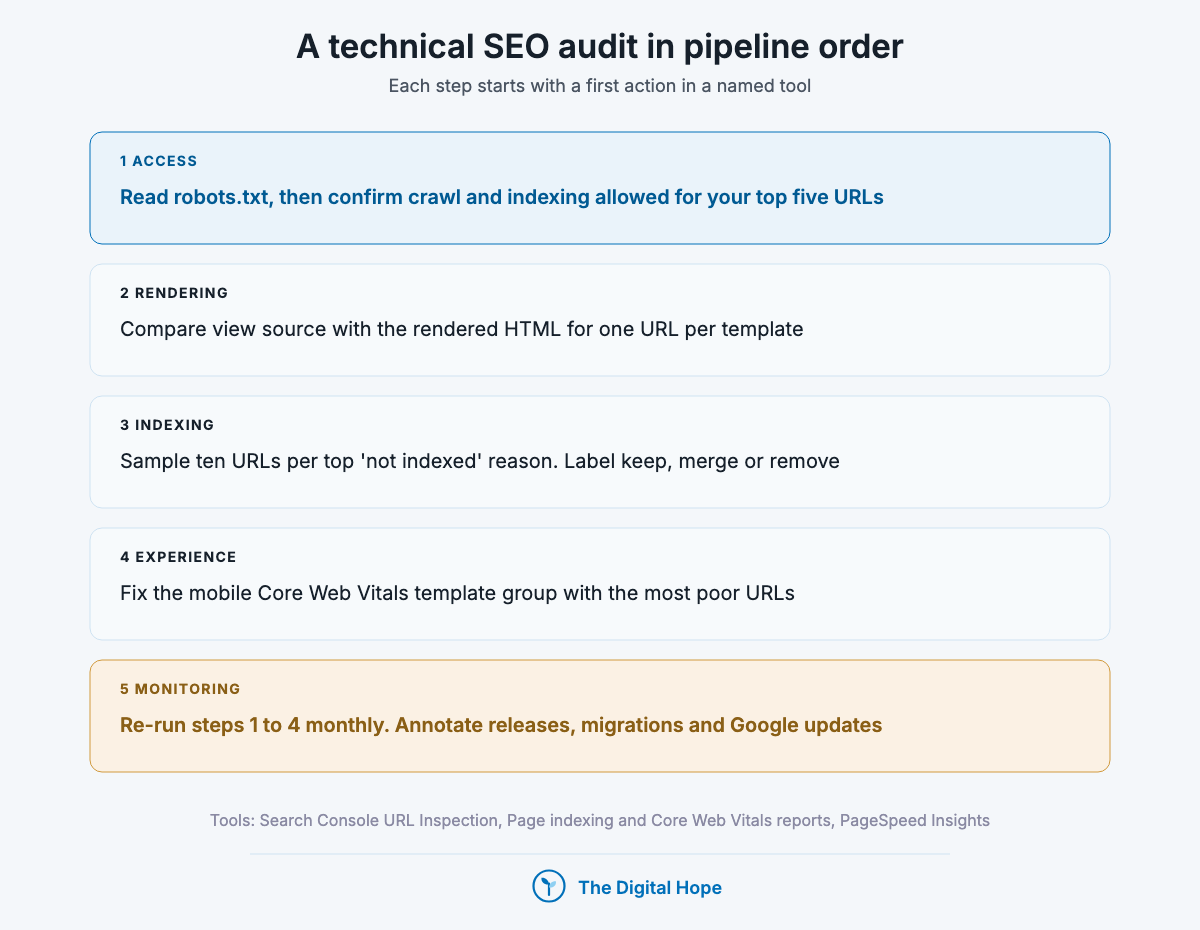
An audit works in the same order as the pipeline: access, rendering, indexing, experience, then monitoring. Fixing speed on a page that isn’t indexed is wasted effort. Each step below starts with a first action in a named tool. The full checklist with every item is the SEO audit checklist.
1. Check that every crawler you want can get in
First action: read robots.txt, then test your five most valuable URLs in Search Console’s URL Inspection tool and confirm “Crawl allowed: Yes” and “Indexing allowed: Yes”.
Then check the CDN or firewall bot settings and the last 30 days of logs for 403s to Googlebot, Bingbot, OAI-SearchBot, Claude-SearchBot and PerplexityBot.
- Does any rule, file or firewall block a search crawler we want?
- Is any production page carrying a leftover staging noindex?
- Does URL Inspection show the canonical we expect?
Start with access. Everything else depends on it.
2. Compare the raw HTML with the rendered page
First action: for one URL per template, compare view source with URL Inspection’s rendered HTML (View crawled page). Anything that only appears in the rendered version is invisible to most AI crawlers.
- Is the main copy in the raw HTML?
- Are navigation and related links plain a href links?
- Are title, canonical and robots tags in the raw HTML?
One URL per template is enough.
3. Sort the Page indexing report into keep and remove
First action: export Indexing, then Pages, sample ten URLs from each of the top three “not indexed” reasons, and label each URL keep, merge, or remove.
- Are any pages we want indexed sitting in “Crawled, currently not indexed”?
- Do canonical tags, internal links and the sitemap agree?
- Which indexed URLs should not exist at all?
Decide on samples, then fix templates.
4. Fix the worst Core Web Vitals template on mobile
First action: open the Core Web Vitals mobile report, pick the URL group with the most poor URLs, and run PageSpeed Insights on one example to find which metric fails and why.
- Which single metric fails across most poor URLs?
- Which third-party scripts can be removed or delayed?
- Does the mobile version carry the same content and tags as desktop?
One template fix beats fifty page fixes.
5. Put the checks on a schedule
First action: set a monthly calendar entry to re-run steps 1 to 4 and annotate every release, migration and Google update next to your Search Console data.
At Forage AI I run technical audits through Claude agents connected over MCP and APIs [FIRST-PARTY, n=1], alongside internal linking and reporting jobs, so the checks run on a schedule instead of when someone remembers. Agents read the same reports a person would. They don’t replace deciding what to fix.
The condition: if you run a 50-page site, a quarterly check is enough. A large site that ships code weekly needs automated checks on every release, because one template change can noindex thousands of URLs overnight.
- Who owns the technical check each month?
- Does every release start a crawl of the changed templates?
- Where do we log what changed and when?
Schedule it, or it won’t happen.
Quick Summary
Q: How do you do a technical SEO audit?
A: In pipeline order. Confirm the crawlers you want can reach key pages, compare raw HTML with the rendered page for each template, sort Search Console’s Page indexing report into keep, merge and remove, fix the worst mobile Core Web Vitals template, then repeat monthly with releases and Google updates annotated.
Insight
Order matters more than thoroughness. A 200-item audit that starts with image compression can miss the staging noindex that took a template out of the index. Search Console’s URL Inspection answers the access and indexing questions for one URL in under a minute, which is why it comes first.
What stopped being true
Technical advice that was once correct and isn’t now. Each row has a primary source you can check.
| What | When | Primary source |
|---|---|---|
| First Input Delay as a Core Web Vital | Replaced by INP on 12 March 2024 | web.dev, INP launch post, 12 Mar 2024 |
| Google’s Mobile-Friendly Test, its API and the Mobile Usability report | Retired from 1 December 2023 (mobile-first indexing itself still applies) | Google Search Central blog, 19 Apr 2023 |
| Search Console’s URL Parameters tool for parameter handling | Deprecated, announced 28 March 2022 and removed a month later | Google Search Central blog, 28 Mar 2022 |
| HowTo rich results | Stopped showing from 13 September 2023 | Google Search Central blog, Aug 2023 |
| FAQ rich results | No longer shown in Google Search from 7 May 2026 | Google Search Central documentation updates |
| WordPress’s “Discourage search engines” adding Disallow: / to robots.txt | Switched to a noindex robots meta tag in WordPress 5.3 | Make WordPress Core, 2 Sep 2019 |
| Blocking Google-Extended to leave AI Overviews | Google-Extended does not affect Search inclusion or ranking | Google common crawlers doc, updated 15 Oct 2026 |
| Blocking GPTBot to leave ChatGPT search | OAI-SearchBot controls ChatGPT search, GPTBot only training | OpenAI crawler documentation, checked 29 Oct 2026 |
| Using robots.txt Disallow to remove a page from Google | Never worked as a removal method: use noindex or a password | Google robots.txt introduction, updated 10 Dec 2025 |
Pulling it all together
Access first: this week, read robots.txt and your CDN bot rules, and confirm Googlebot, Bingbot and the AI search crawlers you want can reach your key pages.
Rendering second: view source on one page per template and move anything that only appears after JavaScript into the server-rendered HTML.
Indexing third: sample the top three “not indexed” reasons in Search Console and decide keep, merge or remove for each sample.
Structure fourth: find orphan and deep money pages in a crawl and link to them from strong pages.
Experience fifth: fix the worst mobile Core Web Vitals template group.
Then the specialist jobs, only if they apply to you: hreflang if you serve several languages or countries, a redirect map before any migration, log files above a few thousand pages, and structured data for the types your pages genuinely contain.
FAQ
What is technical SEO?
Technical SEO is the work that lets search engines and AI crawlers fetch, render, index and understand a site: robots.txt and sitemaps, JavaScript rendering, indexing and canonical signals, site architecture, Core Web Vitals and mobile, structured data, hreflang, redirects and migrations, and log analysis.
What’s the difference between technical SEO and on-page SEO?
Technical SEO is sitewide and template-level: whether pages can be crawled, rendered and indexed, and how fast they are. On-page SEO is what you change on one page, such as content, titles and headings. The two overlap on indexing tags and canonicals, which are set per page but usually fixed per template.
Do small sites need to worry about crawl budget?
Usually not. Google’s crawl budget guide is written for sites with over a million pages changing weekly or over 10,000 changing daily, and the Crawl Stats report says sites under a thousand pages shouldn’t need it. Small sites lose far more to rendering and indexing mistakes.
Does blocking AI crawlers hurt my Google rankings?
Blocking Google-Extended, GPTBot, ClaudeBot or Applebot-Extended doesn’t affect Google Search, according to Google’s and Apple’s documentation. Blocking Googlebot does. Blocking OAI-SearchBot, Claude-SearchBot or PerplexityBot removes you from those AI search products, not from Google.
Is page speed a ranking factor?
Google says Core Web Vitals are used by its ranking systems, within page experience, and that there is no single page experience signal (Sep 2026). A faster page won’t outrank a more useful one. A slow one can lose close contests and loses visitors either way.
Does Google index JavaScript websites?
Yes. Google renders JavaScript with headless Chromium in a step after crawling. The risk is the other crawlers: most AI crawlers didn’t execute JavaScript in Vercel’s 2024 data, so content and links that need JavaScript are invisible to them. Server-side rendering covers both.
In a nutshell
The honest timeline: access and rendering fixes can show in Search Console within days of a re-crawl, but indexing changes on a large site take weeks, and Google says even a clean migration can fluctuate for weeks. Technical work removes what’s holding a site back. It doesn’t make thin content rank, so judge it by indexed pages and crawl health first, and by traffic over months.
When this guide doesn’t apply: if your site is a few dozen server-rendered pages on a well-maintained platform, most of the work here is a one-time check of robots.txt, indexing and mobile speed. Your time is better spent on content and links, which the on-page SEO guide above covers.
If you’d rather have someone run a technical audit or plan a migration with you, that’s what I do in a consultation.
About this article

Written by
Sai Subramaniam
SEO, GEO and Paid Ads Manager · 8+ years in growth marketing
I have run SEO, paid media and ABM for B2B AI companies, consumer apps and live-entertainment brands, from a solo operator at an AI infrastructure company to a team of 20 recovering a million-visitor site after a Google update. I write these guides from that work, and every number in them carries its source.
See my portfolioConnect on LinkedInHow this one was checked. Every number traces to a named source with its dataset and period, and every platform feature, policy or limit cites the platform’s own documentation with the date it was verified. Where the author’s own results appear, they are labelled as one account’s results, with the budget and context, not as a rule.
No affiliate links and no paid placements. Tools are named because they are what practitioners use, not because anyone paid to appear here.
Reviewed: October 2026. Ad platforms and search features change every few months; anything we could not verify at the time of writing is marked as unverified rather than turned into a number.
Corrections. If something here is wrong or has changed since, we would rather know. Corrections are made in place, with a note saying what changed.