
“There’s no way to request or pay for a better local ranking on Google.”
Google Business Profile Help, “Tips to improve your local ranking on Google” (checked 29 Oct 2026)
Last updated: October 2026.
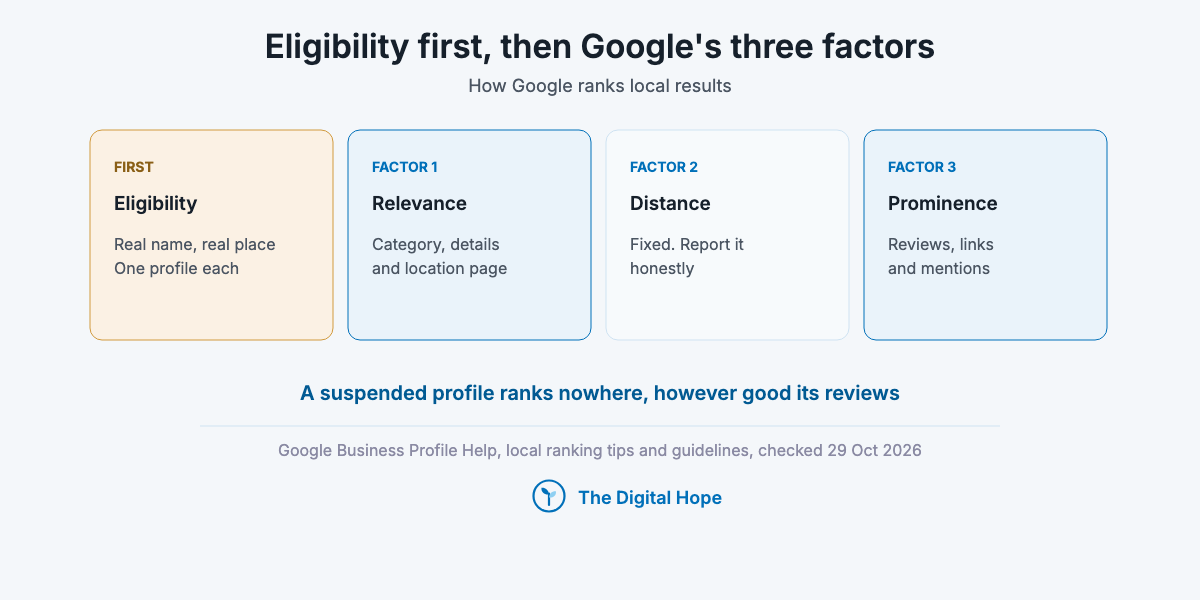
Since 3 November 2025, the Business Profile API no longer supports questions and answers, and on 12 March 2026 Google began rolling out Ask Maps, a Gemini feature that answers questions about places inside Maps, first in the US and India (Search Engine Roundtable’s coverage of the launch, March 2026). The surface keeps changing. Google’s own account of how it ranks local results hasn’t: relevance, distance and prominence, as its Business Profile Help page on local ranking names them (checked 29 Oct 2026).
In local search, eligibility comes before ranking. Here’s the reason. A profile that breaks Google’s name, address or review rules can be suspended or restricted, and a suspended profile ranks nowhere, however good its reviews were. One plumbing business owner described the cost on the Google Business Profile Community on 19 October 2026: “My listing has now been disabled 10 times.”
So these 13 tips run in a fixed order: keep the profile eligible, then make it relevant, then make it prominent, then get it into AI answers, then measure and recover. Each tip names Google’s rule and the condition it holds under: storefront or service-area, one location or many, US or elsewhere.
How we know
Sources: Google Business Profile Help (local ranking tips, business guidelines, restrictions for policy violations, fixing suspended profiles), the Google Maps user contributed content policy, Google Search Central’s LocalBusiness structured data page (updated 8 Sep 2026) and the Business Profile API sunset dates page (updated 28 Aug 2026), each opened on 29 Oct 2026. Most Help pages show no last-updated date, so the date given is the date checked.
Studies: BrightLocal’s Local Consumer Review Survey 2026 (1,002 US adults, self-reported, from a vendor that sells review tools) and Whitespark’s 2026 Local Search Ranking Factors (47 local SEO experts scoring 187 factors, published 6 Nov 2025).
The limit: Google names its three factors but not their weights. Whitespark’s scores are expert opinion, not measurement, so nothing here shows that one change moves a ranking by a set amount.
Quick Digest
– Three factors: relevance, distance and prominence. You can’t change distance, and you can’t pay for rank.
– Eligibility first: the real-world name, a real address or a hidden service area, one profile per location.
– Primary category: the most specific one that says what the business is.
– Reviews: ask every customer the same way, with nothing in return. Asking only happy customers breaks Google’s policy.
– Fake engagement costs more than the reviews: Google can block new reviews, unpublish existing ones and show a public warning.
– AI answers: experts rate third-party lists, service pages and mentions highest, and that’s opinion, not data.
– One table near the end lists what stopped being true, with dates.
How we ordered the tips
Every tip passed three tests, and the order follows the first one.
- It protects the profile before it grows it: suspension risk goes before ranking gains, because a ranking gain on a suspended profile is worth nothing.
- It feeds one of Google’s three factors: relevance, distance or prominence, as Google defines them.
- It has a primary source: Google’s own Help page or policy, dated, with survey and expert data labelled as such.
The 13 tips at a glance
- 1. Confirm eligibility: a real location or a real service area, and one profile per location.
- 2. Use the real-world name: nothing added, however well rivals rank with keywords.
- 3. Set storefront or service area honestly: hide the address if you travel to customers.
- 4. Pick the primary category: what the business is, not what it sells.
- 5. Complete the profile Google describes: hours, attributes, photos, verification.
- 6. Build a landing page per location: unique pages, LocalBusiness markup, linked from the profile.
- 7. Ask every customer for a review: the same way, with no incentive.
- 8. Reply to reviews: especially the bad ones, and never bargain.
- 9. Handle a fake-review attack through policy: document, report, never offset.
- 10. Earn links and mentions: the prominence signal Google names, plus consistent listings.
- 11. Make the business easy to recommend in AI answers: lists, service pages and third-party reviews.
- 12. Measure actions, not rank alone: calls, directions and tagged website clicks.
- 13. If suspended, appeal once: with documents that match the profile.
Keep the profile eligible: three tips before any ranking work
1. Confirm the location is eligible before you work on it
Google’s guidelines decide whether a location gets a profile at all. A business qualifies if it “has a physical location that customers can visit, or travels to customers where they are” (Business Profile guidelines, checked 29 Oct 2026). P.O. boxes and remote mailboxes “aren’t acceptable”, and a virtual office the business doesn’t operate from “isn’t eligible for a Business Profile”. The same page says not to create more than one page for each location, “either in a single account or multiple accounts”.
| Local factor | Eligibility, the precondition for all three factors |
| Google’s rule | A real address customers can visit, or a business that travels to customers. One profile per location |
| Risk if wrong | Suspension or removal of the profile |
| Applies to | Every business, and most of all co-working, home-based and multi-account setups |
| Checked | 29 Oct 2026, Business Profile guidelines (no date shown on the page) |
Who it’s for: Anyone opening a new location, and agencies onboarding a client whose profiles were created by someone else.
In practice: Before you touch categories or photos, list every profile the business has, across every Google account. Search the business name in Maps from each address, and if you inherited the account from a former agency, look for duplicates it left behind or ones tied to an old address. A duplicate counts as more than one page for that location.
Verdict: Audit eligibility before ranking.
2. Use the real-world business name, with nothing added
The name field is where most ranking advice and Google’s rules part ways. Google’s guidelines say the name should reflect the real-world name “as used consistently on your storefront, website, stationery”, and that “including unnecessary information in your business name isn’t permitted”: no service descriptions, locations or taglines. The page warns that this “could result in the suspension of your Business Profile” (checked 29 Oct 2026).
| Local factor | Relevance |
| Google’s rule | The real-world name only. Special characters or legal terms only with real-world proof such as signage |
| Risk if wrong | Suspension |
| Applies to | Every business, and most of all those in categories where rivals stuff names |
| Checked | 29 Oct 2026, Business Profile guidelines |
Here’s the trap. In Whitespark’s 2026 survey, 47 experts scored “keywords in GBP business title” 223 points, third of 187 factors (published 6 Nov 2025). The experts observe that it moves rankings. Google’s rule forbids it. Both can be true, and the second one is what decides whether the profile stays up.
Who it’s for: Storefronts in competitive categories (trades, legal, clinics) where the top three results carry keywords in their names.
In practice: If you want the keyword in the name, it has to be the name on the sign, the website and the invoices first. A rebrand is a business decision. A keyword appended in the profile only is a guideline breach.
Verdict: Rename the business, not the profile.
3. Set storefront or service area correctly, and keep the area honest
Distance is the factor you can’t change, so the job is to report it truthfully. Google defines it as “how far each business is from the customer who’s searching”, and says that if a customer doesn’t share a location, “Google uses what it knows about their location” (local ranking tips, checked 29 Oct 2026). Whitespark’s experts scored proximity to the point of search 225 points, second of 187 (Nov 2025).
| Local factor | Distance |
| Google’s rule | Service-area businesses “should hide your business address from customers”. The area “shouldn’t extend farther than about 2 hours of driving time” from the base |
| Risk if wrong | A listing that can’t be verified, or a service area Google may not accept |
| Applies to | Plumbers, cleaners, mobile services and any business that travels to customers |
| Checked | 29 Oct 2026, Business Profile guidelines |
Who it’s for: Service-area and hybrid businesses, the ones that both receive customers and travel to them.
In practice: A storefront shows its address. A service-area business hides it and lists the areas it serves. A hybrid shows the address only when customers are received there during the stated hours. Listing a wider area doesn’t change how far the base is from the searcher.
Verdict: Report distance, don’t fake it.
Quick Summary
Why does eligibility come before ranking? Because Google can suspend a profile for a name, address or duplicate-profile breach, and a suspended profile doesn’t rank. Confirm one real location per profile, the real-world name and the right storefront or service-area setting before any other work.
Insight
“Including unnecessary information in your business name isn’t permitted.”
Google Business Profile guidelines (checked 29 Oct 2026)
Make it relevant: what Google matches to the search
4. Pick the primary category that says what the business is
Relevance starts with the category. Google defines relevance as “how well a Business Profile matches what someone is searching for”, and its guidelines say to “use as few categories as possible to describe your overall core business”, framed as “This business IS a”, not a list of everything it offers (checked 29 Oct 2026). Whitespark’s experts put primary category first of 187 factors, at 227 points (Nov 2025).
| Local factor | Relevance |
| Google’s rule | As few categories as possible, from Google’s list, describing the core business |
| Risk if wrong | Showing for the wrong searches, or missing the main one |
| Applies to | Every business, and most of all those with several services |
| Checked | 29 Oct 2026, Business Profile guidelines |
Who it’s for: Businesses whose main service and broad trade differ, like an emergency plumber filed under a generic contractor category.
In practice: Search your main service in Maps from your own location and open the top three profiles. Their primary categories are the shortlist. Pick the most specific one that is true of your business, and add secondary categories only when the business is that thing too.
Verdict: Specific beats broad.
5. Complete the profile Google describes, and keep the hours true
Google publishes its own short list of what helps. Its local ranking page names five things: complete and accurate details (address, hours, category, attributes like parking or Wi-Fi), verification, regular and special hours, replies to reviews, and photos and videos (checked 29 Oct 2026). That list is the floor, and most of it takes an afternoon.
| Local factor | Relevance |
| Google’s rule | “Provide your regular customer-facing hours of operation”. Some types, such as hotels, schools and movie theaters, shouldn’t list hours |
| Risk if wrong | Customers arriving to a closed door, and edits suggested by users that overwrite yours |
| Applies to | Every verified profile |
| Checked | 29 Oct 2026, local ranking tips and Business Profile guidelines |
Who it’s for: Any business with seasonal or holiday hours, where a wrong “Open” is the fastest way to a one-star review.
In practice: If you close on public holidays, set special hours for each one at the start of the year, and add attributes that answer the questions customers ask on the phone: parking, accessibility, payment methods. Add photos of the real premises and real work.
Verdict: Accurate beats exhaustive.
6. Build one landing page per location, and link it from the profile
The profile ranks in Maps. The landing page ranks in the organic results below it, and gives both a source to agree with. Google’s LocalBusiness structured data page (updated 8 Sep 2026) requires `name` and `address`, recommends `openingHoursSpecification`, `geo`, `telephone`, `url`, `priceRange` and `department`, and says the markup can tell Google about business hours and departments. Whitespark’s experts scored keywords in the landing page title tag 146 points, 17th (Nov 2025).
| Local factor | Relevance and prominence |
| Google’s rule | LocalBusiness markup needs `name` and `address`. `aggregateRating` and `review` markup are only for sites that capture reviews of other local businesses |
| Risk if wrong | City pages with swapped place names, which Google’s spam policies list as doorway abuse (updated 28 Aug 2026) |
| Applies to | Every business with a website, and most of all multi-location brands |
| Checked | 29 Oct 2026, Search Central LocalBusiness structured data |
One rule that catches people: Google’s page limits review markup to sites that review other local businesses, so marking up your own Google reviews on your own location page isn’t what the property is for.
Who it’s for: Multi-location brands need one page per location. A single-location business can point the profile at its homepage, but only when the homepage carries the address, hours and services.
In practice: Give each location page what only that location has: its address and hours, its staff, the areas it serves, directions and its own photos. Titles, headings and internal links follow on-page SEO, and markup, crawling and indexing follow technical SEO.
Verdict: One real page per real location.
Quick Summary
How do you make a profile relevant? Choose the most specific true primary category, complete the details Google lists (hours, attributes, photos, verification), and back each location with a unique landing page that carries LocalBusiness markup with its name and address.
Insight
“Use as few categories as possible to describe your overall core business from the provided list.”
Google Business Profile guidelines (checked 29 Oct 2026)
Make it prominent: reviews, links and mentions
7. Ask every customer for a review, the same way, with nothing in return
Reviews are the prominence signal Google names outright. “More reviews and positive ratings can help your business’s local ranking,” says its local ranking page (checked 29 Oct 2026). Customers read them too: in BrightLocal’s 2026 survey of 1,002 US adults, 97% read local reviews, 41% always read them, and 47% said they wouldn’t use a business with fewer than 20 reviews. It is self-reported, from a vendor that sells review tools.
| Local factor | Prominence |
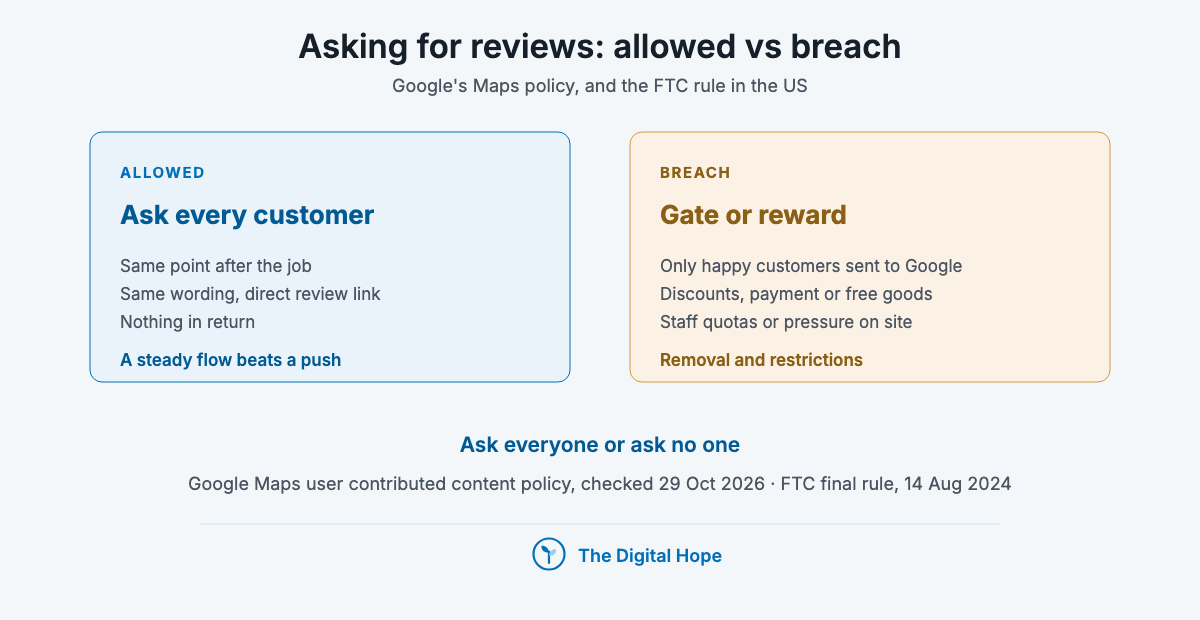
| Google’s rule | No incentives (“payment, discounts, free goods and/or services”), no selective solicitation of positive reviews, no discouraging negative ones, no pressure on the premises, no staff quotas |
| Risk if wrong | Review removal, profile restrictions, and in the US, FTC civil penalties |
| Applies to | Every business that asks for reviews |
| Checked | 29 Oct 2026, Google Maps user contributed content policy |
Review gating breaks the policy. A funnel that sends happy customers to Google and unhappy ones to a private form is what Google’s Maps user contributed content policy means by selectively soliciting positive reviews. In the US, the FTC’s final rule (announced 14 Aug 2024) also bans fake reviews including AI-generated ones, bought reviews, undisclosed insider reviews and review suppression, with civil penalties for knowing violators.
Who it’s for: Every business, and US businesses with a review vendor should check the vendor’s flow against both rules.
In practice: Send one request to every customer at the same point (after the job, with the invoice, in the follow-up email), with the same wording and the direct review link. If you use a review vendor, check that its flow sends every customer to that link, with no filtering step in between. Whitespark’s experts rate review recency 164 points (11th) and quantity with text 170 (9th), so a steady flow beats a one-off push.
Verdict: Ask everyone or ask no one.
8. Reply to reviews, especially the bad ones
Google lists replying among its own tips: “Reply to customer reviews, and work to get more of them” (local ranking tips, checked 29 Oct 2026). It doesn’t say replies move ranking, and no study in our evidence measures that. The reply is for the next reader, who sees how the business handles a problem.
| Local factor | Prominence (indirect) |
| Google’s rule | No rewards for revising or removing a negative review |
| Risk if wrong | An offer of a refund “if you update your review” is an incentive under the policy |
| Applies to | Every profile with reviews |
| Checked | 29 Oct 2026, Google Maps user contributed content policy |
Who it’s for: Owners and agencies answering reviews in competitive categories, where several rivals sit within half a star.
In practice: Thank good reviews briefly. For bad ones, state the fix and a direct contact without the customer’s personal details. Resolve the complaint offline, and let the customer decide whether to change the review. When you offer a refund, offer it for the complaint, never for the review.
Verdict: Reply in public, settle in private.
9. Handle a fake-review attack through policy, not retaliation
A burst of one-star reviews moves a small profile’s average fast, and the appeal can take weeks. One Google Business Profile Community thread title, posted 27 Oct 2026, reads: “Review Appeal Escalated 16+ Days Ago, Coordinated Fake Review Attack.”
| Local factor | Prominence |
| Google’s rule | Businesses that violate the Fake Engagement policy may have new reviews blocked “for set period of time”, existing reviews unpublished, and a warning shown “to let consumers know that fake reviews were removed” |
| Risk if wrong | Buying reviews to offset an attack puts these restrictions on your profile, and in the US adds FTC exposure |
| Applies to | Businesses in competitive local categories |
| Checked | 29 Oct 2026, Business Profile Help, restrictions for policy violations |
Who it’s for: Any business that wakes up to several one-star reviews with similar wording inside a day.
In practice: Screenshot every review with its date when you first see the burst. Report each one through the profile, reply calmly to each one in public, and keep asking real customers the same way you always do. Google’s page on restrictions for policy violations says it notifies owners by email before a restriction and that businesses can appeal.
Verdict: Document, report, never offset.
10. Earn links and mentions from local and industry sites
Google names links in its definition of prominence. Prominence, it says, is “how well-known a business is”, based on “info like how many websites link to your business and how many reviews you have” (local ranking tips, checked 29 Oct 2026). The page doesn’t mention directories or citations. That’s where expert opinion fills the gap: Whitespark’s experts score citations as a smaller factor for the map pack and a large one for AI visibility (Nov 2025).
| Local factor | Prominence |
| Google’s rule | Links count toward prominence. Paid links must follow Google’s link spam policy |
| Risk if wrong | Bought link packages, which Google’s spam policies treat as link spam |
| Applies to | Every business, and most of all new ones with few reviews |
| Checked | 29 Oct 2026, local ranking tips |
Who it’s for: Single-location businesses earn this through local press, suppliers, associations and sponsorships. Multi-location brands add one job: the same name, address and phone number on every directory listing they control, so no listing contradicts the profile.
In practice: List every place the business is described online (directories, the chamber of commerce, industry associations, suppliers’ “where to buy” pages) and correct the ones with an old address or number, starting with any that appear when you search the business name. Then earn the ones you can’t fill in yourself. Link building in full sits in off-page SEO.
Verdict: Earn the mention, then fix the listing.
Quick Summary
How does a business become more prominent in local search? Google names two inputs: how many websites link to the business and how many reviews it has. Ask every customer for a review with no incentive, reply to reviews, report fake ones instead of offsetting them, and earn links and mentions from local and industry sites.
Insight
“More reviews and positive ratings can help your business’s local ranking.”
Google Business Profile Help, local ranking tips (checked 29 Oct 2026)
Get into AI answers
11. Make the business easy to recommend in AI answers
AI answers now sit on top of local search in Google and around it elsewhere. Ask Maps answers questions about places inside Google Maps (rolling out from 12 March 2026 in the US and India, per Search Engine Roundtable’s coverage), and assistants such as ChatGPT and Gemini recommend local businesses by name. Google hasn’t documented how local businesses are chosen for these answers.
| Local factor | Prominence, as AI systems read it |
| Google’s rule | No published local-specific guidance for AI features (checked 29 Oct 2026) |
| Risk if wrong | Low, if the work is real lists, real pages and real reviews. High, if it means fake listicles about yourself |
| Applies to | Businesses whose customers ask assistants for recommendations: trades, dining, healthcare, professional services |
| Checked | 29 Oct 2026; Whitespark survey published 6 Nov 2025 |
What the experts think, labelled as opinion. Whitespark added AI search visibility to its 2026 survey. Its 47 experts ranked “presence on expert curated best-of lists” first at 179 points, then a dedicated page for each service (170), prominence on industry-relevant domains (167), unstructured citations in news, blogs and associations (160) and the authority of third-party sites carrying reviews (156). Darren Shaw summarised it as “mentions (citations) are the new link.” These are expert scores, not measured outcomes.
Who it’s for: Businesses that already rank in the map pack but don’t get named when someone asks an assistant.
In practice: Pick five real customer questions (“best emergency plumber near Camden open now”). Ask them monthly in Google’s AI Mode, ChatGPT and Gemini and record whether the business is named and which sources are cited. Pursue the cited lists and sites first if you find the business missing from the answers. The wider method is in generative engine optimization.
Verdict: Opinion today, so test it monthly.
Quick Summary
How do local businesses show up in AI answers? Google hasn’t published how its AI features choose local businesses. Expert opinion (Whitespark, 47 experts, Nov 2025) ranks best-of lists, a page per service, industry mentions and third-party reviews highest. Track five real questions monthly and chase the sources the answers cite.
Insight
“In AI SEO, mentions (citations) are the new link.”
Darren Shaw, Whitespark, 2026 Local Search Ranking Factors (6 Nov 2025)
Measure and recover
12. Measure calls, directions and website clicks, not rank alone
Local rank changes with where the searcher stands, because distance is one of Google’s three factors. A single rank check from the office tells you how the business ranks at the office. Customer actions are the steadier measure: the profile’s performance report counts actions such as calls, direction requests and website clicks.
| Local factor | Measurement |
| Google’s rule | Profile performance moved to the Business Profile Performance API. The old `reportInsights` method was discontinued on 30 Mar 2023 |
| Risk if wrong | Reporting a “drop” that is one searcher location, or crediting the profile’s clicks to organic search |
| Applies to | Every business that reports on local, and every agency reporting to a client |
| Checked | 29 Oct 2026, Business Profile API sunset dates (updated 28 Aug 2026) |
Who it’s for: Agencies and multi-location brands that report local results monthly.
In practice: Add UTM parameters to the profile’s website link so GA4 shows profile visits apart from other organic search. If you run several locations, track calls and direction requests per location month on month, and if you track rank, track it from a grid of points across the service area, not one address.
Verdict: Count actions, then positions.
13. If the profile is suspended, appeal once, with documents that match
A suspension is the most expensive local SEO problem, and the fix is narrow. The plumbing owner quoted at the top added: “I cannot run Google Ads while my profile is disabled” (Google Business Profile Community, 19 Oct 2026). Google’s page on fixing suspended profiles says “Appeals can only be submitted once” and “Do not create a new Business Profile for the same business” (checked 29 Oct 2026).
| Local factor | Eligibility |
| Google’s rule | Appeal through the appeals tool, with optional evidence: business registration, a business licence, tax certificates or utility bills, with the name and address matching the profile |
| Risk if wrong | A second profile for the same business, or a single appeal spent with weak evidence |
| Applies to | Any suspended or disabled profile |
| Checked | 29 Oct 2026, Business Profile Help, fix suspended or disabled profiles |
Who it’s for: Owners who received a suspension email, and agencies handling a client’s appeal.
In practice: First fix the likely cause. If you can’t tell which rule the profile broke, start with the three in tips 1 to 3: a keyword in the name, an ineligible address, a duplicate profile. Then gather documents where the business name and address match the profile exactly, and write a short factual explanation. Don’t create a replacement profile while you wait.
Verdict: One appeal, best evidence.
Quick Summary
What should you do if a Business Profile is suspended? Fix the breach first, then use Google’s appeals tool once, with registration, licence, tax or utility documents whose name and address match the profile. Google’s Help page says appeals can only be submitted once and not to create a new profile for the same business.
Insight
“Do not create a new Business Profile for the same business.”
Google Business Profile Help, fix suspended or disabled profiles (checked 29 Oct 2026)
All 13 tips compared
| Tip | Google factor | Applies to | Effort | Risk if skipped |
|---|---|---|---|---|
| 1. Confirm eligibility | Eligibility | Every business | Low | Suspension |
| 2. Real-world name | Relevance | Every business | Low (unless rebranding) | Suspension |
| 3. Storefront or service area | Distance | Service-area and hybrid | Low | Verification problems |
| 4. Primary category | Relevance | Every business | Low | Wrong searches |
| 5. Complete profile | Relevance | Every verified profile | Low | Wrong hours, user edits |
| 6. Landing page per location | Relevance, prominence | Businesses with a site | Medium | Doorway pages if faked |
| 7. Ask every customer | Prominence | Every business | Ongoing | Fewer, older reviews |
| 8. Reply to reviews | Prominence (indirect) | Every profile | Ongoing | Unanswered complaints |
| 9. Fake-review response | Prominence | Competitive categories | As needed | Restrictions if you offset |
| 10. Links and mentions | Prominence | Every business | High | Weak prominence |
| 11. AI answers | Prominence, AI | Recommendation-led categories | Medium | Missing from assistants |
| 12. Measure actions | Measurement | Anyone reporting | Low | Misread drops |
| 13. Appeal once | Eligibility | Suspended profiles | As needed | Lost appeal |
Which tips come first, by situation
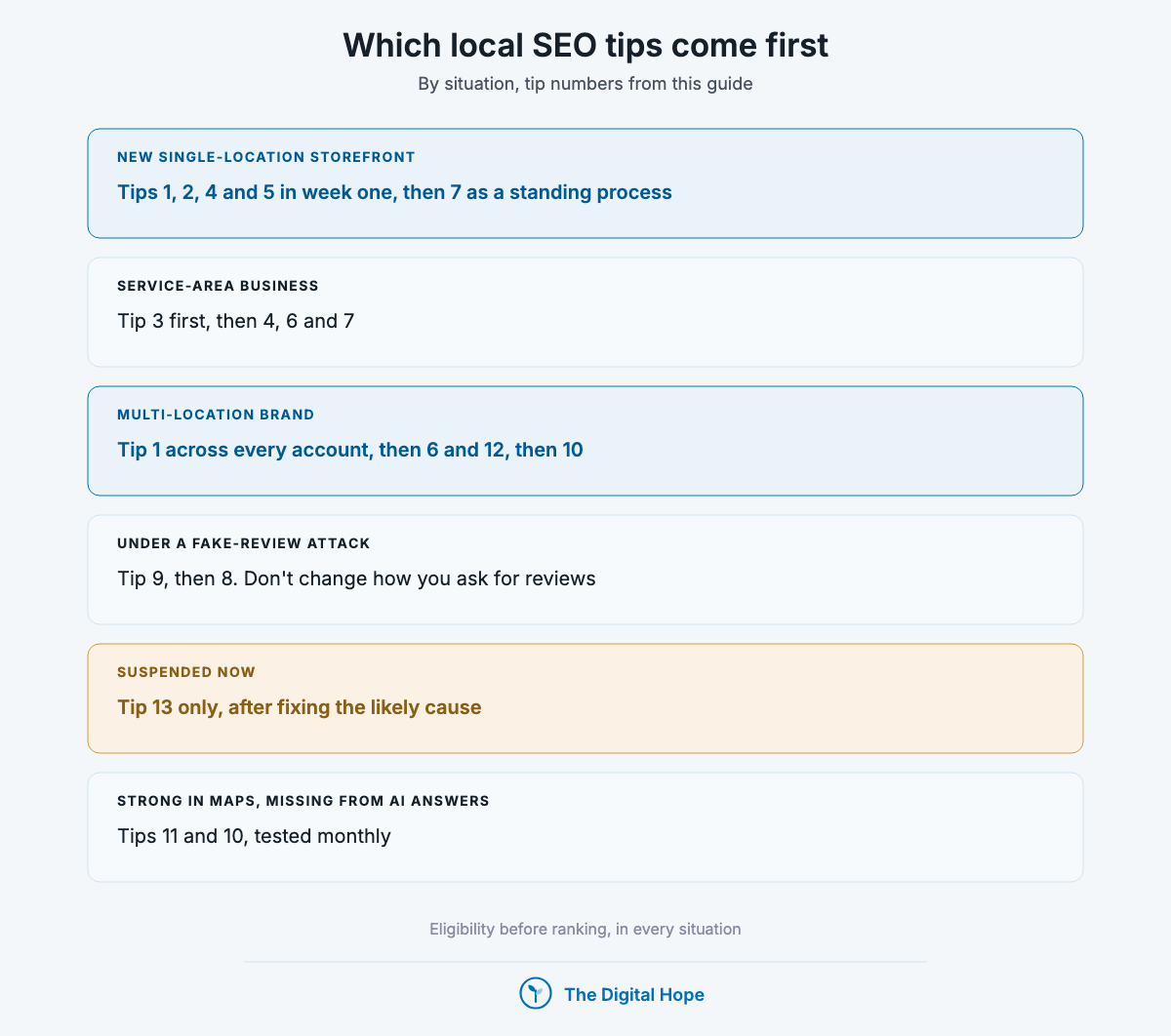
- New single-location storefront: tips 1, 2, 4 and 5 in the first week, then 7 as a standing process.
- Service-area business: tip 3 first, then 4, 6 and 7. Your ranking radius is set by where the base is.
- Multi-location brand: tip 1 across every account to find duplicates, then 6 and 12, then 10 for listing consistency.
- Under a fake-review attack: tip 9, then 8. Don’t change how you ask for reviews.
- Suspended now: tip 13 only, after fixing the cause the suspension most likely rests on.
- Strong in Maps, missing from AI answers: tips 11 and 10, tested monthly.
What stopped being true
| What | When | Primary source |
|---|---|---|
| “Google My Business” as the product name | Renamed Google Business Profile, November 2021 | Google’s announcement, Nov 2021 |
| Websites built inside the Business Profile | Turned off 5 Mar 2024, with redirects to the profile ending 10 Jun 2024 | Business Profile Help |
| Chatting with customers from the profile | Removed 31 Jul 2024 | Google’s announcement, May 2024 |
| Profile insights through the API’s `reportInsights` | Discontinued 30 Mar 2023, replaced by the Performance API | Business Profile API sunset dates (updated 28 Aug 2026) |
| Managing questions and answers through the API | Support ended 15 Sep 2025, discontinued 3 Nov 2025 | Business Profile API sunset dates (updated 28 Aug 2026) |
| Bought, fake or AI-written reviews as a grey area in the US | FTC final rule announced 14 Aug 2024, with civil penalties | US Federal Trade Commission |
| Fake engagement costing only the removed reviews | Profile restrictions: new reviews blocked, existing ones unpublished, a public warning | Business Profile Help, restrictions for policy violations (checked 29 Oct 2026) |
Pulling it all together
Eligibility first: one profile per real location, the real-world name, and the right storefront or service-area setting.
Relevance second: the most specific true primary category, complete details and hours, and a unique landing page per location with LocalBusiness markup.
Prominence third: reviews from every customer with no incentive, replies to every review, and links and mentions from local and industry sites.
Then AI answers and measurement: track real questions in assistants monthly, and report calls, directions and tagged clicks rather than one rank check.
FAQ
How does Google rank local businesses?
Google names three factors on its Business Profile Help page: relevance (how well the profile matches the search), distance (how far the business is from the searcher) and prominence (how well-known the business is, including links and reviews). It doesn’t publish their weights, and it says there’s no way to pay for a better local ranking.
Should I put keywords in my Business Profile name?
No, unless they’re part of the real-world name on your sign, website and stationery. Google’s guidelines say unnecessary information in the name isn’t permitted and can lead to suspension. Experts rate keyword names highly for ranking, which is exactly why it’s a common breach.
Do Business Profile posts help local ranking?
Google’s local ranking page doesn’t list posts among its tips (checked 29 Oct 2026). Posts can inform customers who already found the profile. Treat them as content for customers, not as a ranking lever.
How many reviews does a local business need?
Google sets no number. In BrightLocal’s 2026 survey of 1,002 US adults, 47% said they wouldn’t use a business with fewer than 20 reviews. That’s a customer threshold, not a ranking one, and it’s self-reported.
Can I rank in a city where I don’t have an address?
In the map pack, distance from the searcher to the business is one of Google’s three factors, so a business far from the searcher is at a disadvantage. A service-area business can list areas within about two hours’ drive, and a location page can rank in the organic results for that city, which sit separately from the map pack.
Do citations and NAP consistency still matter?
Google’s local ranking page names links and reviews, not directories. Consistent name, address and phone details matter so no listing contradicts the profile, and Whitespark’s experts rate third-party mentions highly for AI visibility. Fix the listings you control, then earn the mentions you can’t create.
In a nutshell
The law, restated: in local search, eligibility comes before ranking. A profile that follows Google’s name, address and review rules can then compete on relevance and prominence. Distance stays fixed, so no tip here moves a business closer to the searcher.
The honest timeline: eligibility and category fixes are an afternoon’s work. Reviews and mentions build over months, and Google publishes no time to a ranking change. Some suspended profiles don’t come back, which is why the first three tips come first.
When this guide doesn’t apply: a business with no location customers can visit and no travel to customers, such as an online-only shop, isn’t eligible for a Business Profile at all. Its local visibility work is ordinary on-page SEO and links.
If you’d rather have someone review a profile, a suspension or a multi-location setup with you, that’s what I do in a consultation.
About this article

Written by
Sai Subramaniam
SEO, GEO and Paid Ads Manager · 8+ years in growth marketing
I have run SEO, paid media and ABM for B2B AI companies, consumer apps and live-entertainment brands, from a solo operator at an AI infrastructure company to a team of 20 recovering a million-visitor site after a Google update. I write these guides from that work, and every number in them carries its source.
See my portfolioConnect on LinkedInHow this one was checked. Every number traces to a named source with its dataset and period, and every platform feature, policy or limit cites the platform’s own documentation with the date it was verified. Where the author’s own results appear, they are labelled as one account’s results, with the budget and context, not as a rule.
No affiliate links and no paid placements. Tools are named because they are what practitioners use, not because anyone paid to appear here.
Reviewed: October 2026. Ad platforms and search features change every few months; anything we could not verify at the time of writing is marked as unverified rather than turned into a number.
Corrections. If something here is wrong or has changed since, we would rather know. Corrections are made in place, with a note saying what changed.